How to Create a Cinematic Editorial Portrait with a Dramatic Red Background
Learn how to generate a striking, cinematic editorial portrait using an uploaded image. This AI prompt creates a high-fashion, low-angle shot with deep sculpted shadows, messy wet-look hair, and an intense saturated red background, perfect for bold profile pictures or creative character designs.
Generated Images

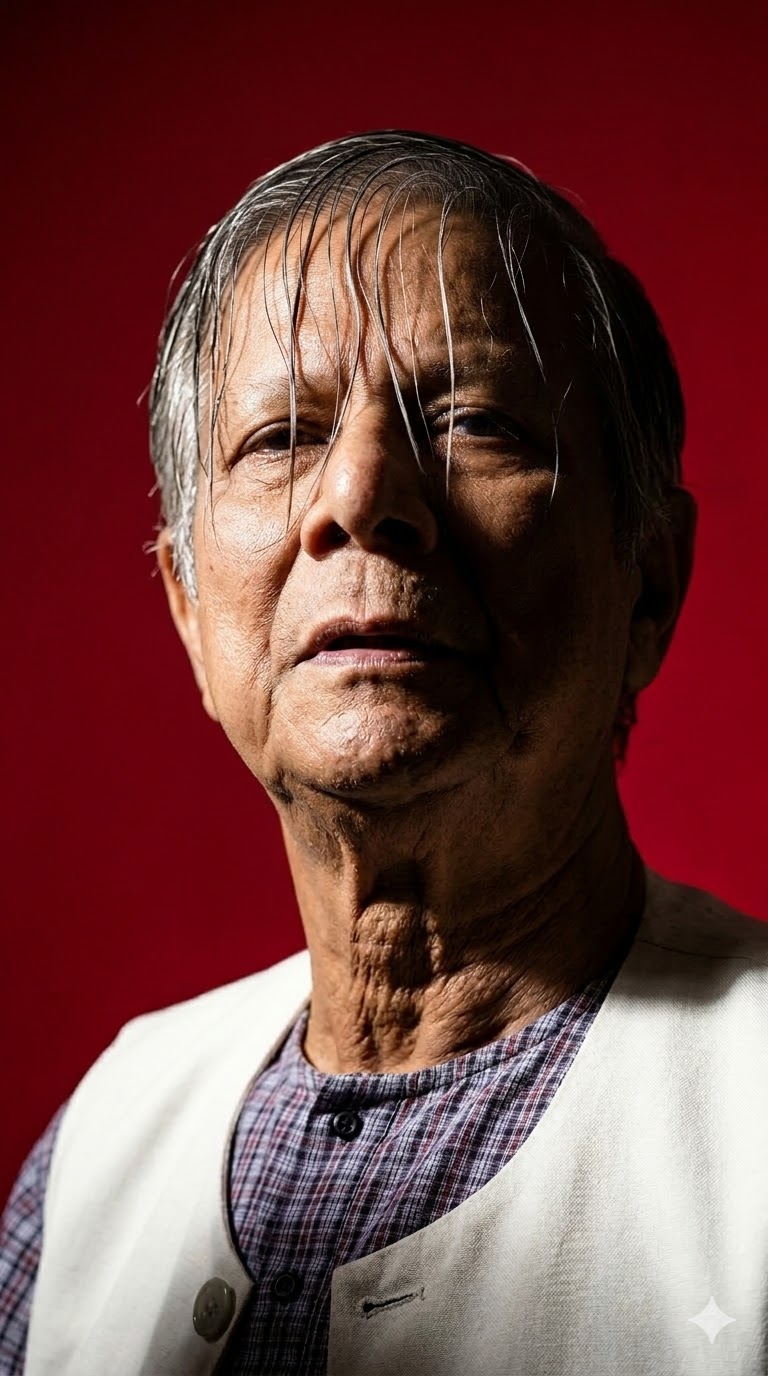
The Prompt
cinematic editorial close-up portrait of me with exact same facial and physical identity from the uploaded image , low-angle shot with his head tilted slightly back, intense saturated red background (solid color field), messy wet-look curly hair falling over the forehead and partially covering one eye, sharp jawline , lips slightly parted, strong hard key light from the side creating deep sculpted shadows across the face and neck, ar 9:16
How to Use
To customize this prompt, you can easily adjust several elements. 1. Change the background color by replacing 'intense saturated red background' with your preferred color, like 'deep ocean blue' or 'stark white'. 2. Modify the hairstyle by swapping 'messy wet-look curly hair' for 'slicked back hair' or 'neatly styled short hair'. 3. Alter the lighting by changing 'strong hard key light' to 'soft diffused lighting' or 'neon rim lighting'. 4. Adjust the camera angle by replacing 'low-angle shot' with 'eye-level profile' or 'high-angle shot'.
Prompt Variations
cinematic editorial close-up portrait of me with exact same facial and physical identity from the uploaded image, low-angle shot with head tilted slightly back, deep moody blue background (solid color field), slicked back hair, sharp jawline, lips slightly parted, soft diffused studio lighting creating gentle gradients across the face and neck, ar 9:16
cinematic editorial close-up portrait of me with exact same facial and physical identity from the uploaded image, straight-on eye level shot, vibrant neon purple background (solid color field), messy wet-look curly hair falling over the forehead, sharp jawline, intense neon rim light from behind creating glowing edges across the face and neck, ar 9:16
cinematic editorial close-up portrait of me with exact same facial and physical identity from the uploaded image, high-angle shot looking slightly up, stark white background (solid color field), perfectly styled short hair, sharp jawline, bright high-key lighting eliminating shadows across the face and neck, ar 9:16
cinematic editorial close-up portrait of me with exact same facial and physical identity from the uploaded image, low-angle shot with head tilted slightly back, rich emerald green background (solid color field), wind-blown voluminous hair, sharp jawline, warm golden hour directional light creating striking contrast across the face, ar 9:16
cinematic editorial close-up portrait of me with exact same facial and physical identity from the uploaded image, low-angle shot, pure black background (solid color field), messy wet-look curly hair, sharp jawline, dramatic chiaroscuro lighting creating deep shadows and bright highlights across the face, black and white photography, ar 9:16
cinematic editorial close-up portrait of me with exact same facial and physical identity from the uploaded image, low-angle shot, warm mustard yellow background (solid color field), messy wet-look curly hair falling over the forehead, sharp jawline, vivid cinematic lighting with a teal gel light from the side creating stylized color contrast, ar 9:16
cinematic editorial close-up portrait of me with exact same facial and physical identity from the uploaded image, profile shot looking away, textured dark grey concrete background, messy wet-look curly hair, sharp jawline, harsh overhead spotlight creating dramatic top-down shadows across the face and neck, ar 9:16
FAQ
- How do I ensure the AI keeps my exact facial identity?To maintain your exact facial identity, use an AI image generator that supports image prompting or character reference features, such as Midjourney's '--cref' parameter. Upload a clear, high-quality photo of your face to use as the base reference alongside this text prompt.
- Can I change the aspect ratio for different social media platforms?Yes. The current prompt ends with 'ar 9:16', which is ideal for TikTok, Instagram Reels, and Stories. If you want a square image for a standard Instagram post, change it to 'ar 1:1'. For a widescreen cinematic look, use 'ar 16:9'.
- What AI tools work best for generating this editorial portrait?This prompt is highly optimized for Midjourney v6 due to its detailed lighting and styling descriptions. It will also work beautifully with Stable Diffusion (using ControlNet for face consistency) and advanced versions of DALL-E 3, though you may need to adjust the aspect ratio parameter depending on the tool's specific syntax.
Related Prompts


