Dreamy Blurred Portrait AI Prompt with Motion Effect
This prompt creates a moody, cinematic portrait with intentional motion blur and a teal color grade. It transforms your photo into a dreamy, analog-style image with a hoodie, soft haze, and film grain.
Generated Images

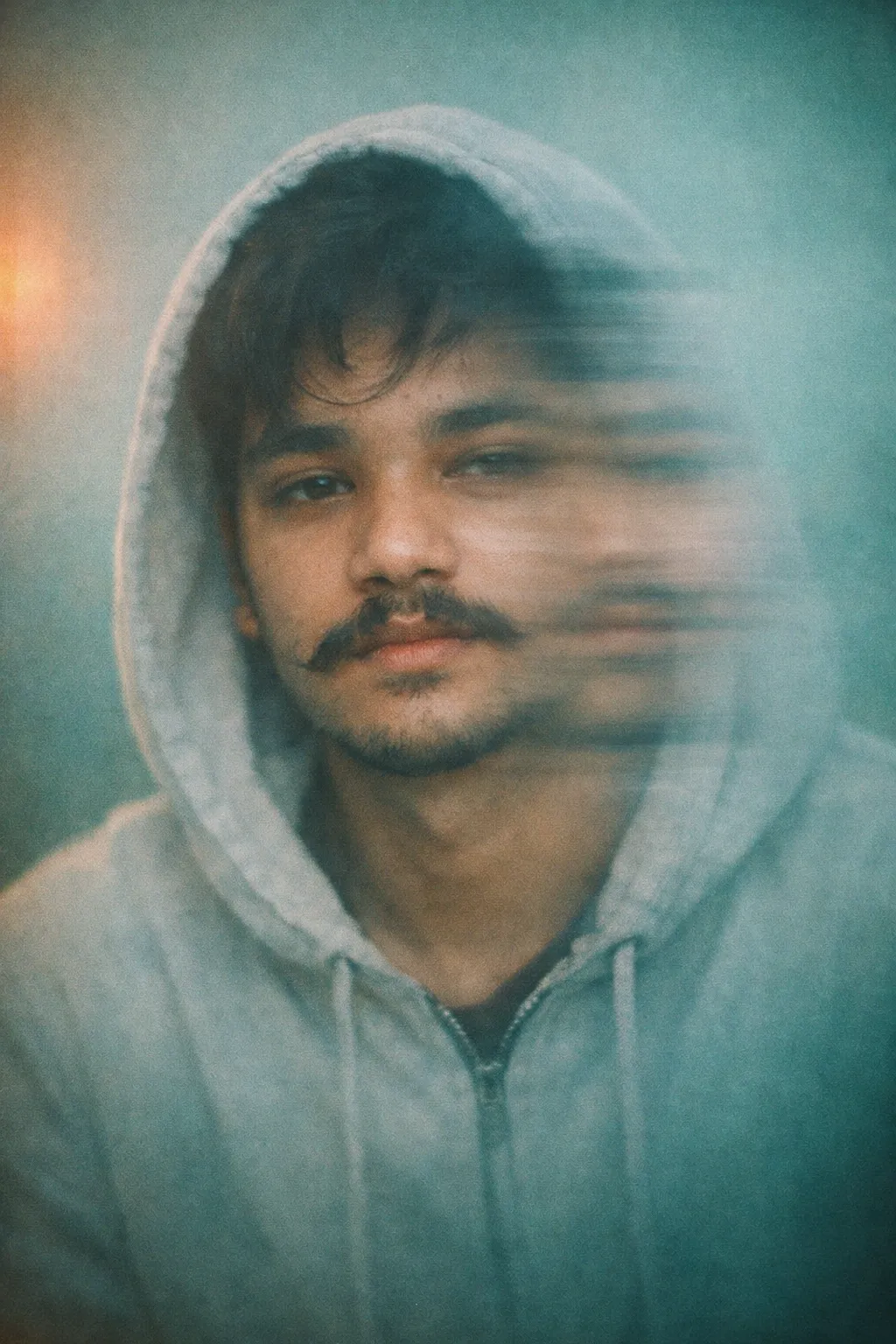
The Prompt
cinematic blurred portrait, me as subject with exact same facial and physical features from the uploaded image wearing light hoodie, hood up, neutral background, teal green color grading, warm light leak on left side, face partially smeared with lateral motion blur, double exposure blur effect, soft haze, low contrast, shallow depth of field, film grain, moody atmosphere, melancholic expression, minimal composition, dreamy realism, analog photography feel, subtle vignette . aspect ratio 9:16
How to Use
1. Upload a clear photo of yourself to your AI image generator. 2. Copy and paste this entire prompt. 3. Set the aspect ratio to 9:16 vertical. 4. Generate the image. This works well in AI tools that support artistic styles and image prompting, like Midjourney, Stable Diffusion, or Leonardo.AI.
Prompt Variations
1. 1. Vertigo Tilt Blur Effect
This variation replaces lateral motion blur with a circular/vertigo-style tilt blur around the face, intensifying the disorienting and dreamlike quality.
cinematic blurred portrait, me as subject with exact same facial and physical features from the uploaded image wearing light hoodie, hood up, neutral background, teal green color grading, warm light leak on left side, face partially smeared with circular tilt-shift blur creating a vertigo effect, double exposure blur effect, soft haze, low contrast, shallow depth of field, film grain, moody atmosphere, melancholic expression, minimal composition, dreamy realism, analog photography feel, subtle vignette, aspect ratio 9:16.
2. 2. Sun-Drenched Light Leak Variation
Shifts the color palette to warm, sun-drenched tones with a stronger, more radiant light leak for a nostalgic, golden-hour feel.
cinematic blurred portrait, me as subject with exact same facial and physical features from the uploaded image wearing light hoodie, hood up, neutral background, warm golden color grading, intense sun-drenched light leak on left side, face partially smeared with lateral motion blur, double exposure blur effect, soft haze, low contrast, shallow depth of field, film grain, nostalgic atmosphere, melancholic expression, minimal composition, dreamy realism, analog photography feel, subtle vignette, aspect ratio 9:16.
3. 3. Urban Rain-Smeared Window
Changes the neutral background to a rainy cityscape seen through a window, with rain streaks adding another layer of texture and blur.
cinematic blurred portrait, me as subject with exact same facial and physical features from the uploaded image wearing light hoodie, hood up, background is a rainy cityscape seen through a blurred window, teal green color grading, warm light leak on left side, face partially smeared with lateral motion blur, double exposure blur effect, rain-streaked glass texture, soft haze, low contrast, shallow depth of field, film grain, moody atmosphere, melancholic expression, minimal composition, dreamy realism, analog photography feel, subtle vignette, aspect ratio 9:16.
4. 4. High-Contrast Monochrome Dream
Transforms the image into a high-contrast black and white portrait, emphasizing texture, grain, and the play of light and shadow.
cinematic blurred portrait, me as subject with exact same facial and physical features from the uploaded image wearing light hoodie, hood up, neutral background, high-contrast black and white color grading, stark light leak on left side, face partially smeared with lateral motion blur, double exposure blur effect, soft haze, shallow depth of field, heavy film grain, moody atmosphere, melancholic expression, minimal composition, dramatic shadows, analog photography feel, subtle vignette, aspect ratio 9:16.
5. 5. Prismatic Double Exposure Fusion
Enhances the double exposure effect by subtly blending in abstract textures like foliage or flowing fabric, creating a more complex, layered image.
cinematic blurred portrait, me as subject with exact same facial and physical features from the uploaded image wearing light hoodie, hood up, neutral background, teal green color grading, warm light leak on left side, face partially smeared with lateral motion blur, enhanced double exposure effect blending abstract flowing fabric textures, soft haze, low contrast, shallow depth of field, film grain, moody atmosphere, melancholic expression, minimal composition, dreamy realism, analog photography feel, subtle vignette, aspect ratio 9:16.
6. 6. Ethereal Pastel Tones
Softens the entire palette to pastel pinks and lavenders, creating a more gentle, ethereal, and less melancholic dreamy atmosphere.
cinematic blurred portrait, me as subject with exact same facial and physical features from the uploaded image wearing light hoodie, hood up, neutral background, soft pastel pink and lavender color grading, warm pastel light leak on left side, face partially smeared with lateral motion blur, double exposure blur effect, soft haze, very low contrast, shallow depth of field, fine film grain, ethereal atmosphere, contemplative expression, minimal composition, dreamy realism, analog photography feel, subtle vignette, aspect ratio 9:16.
7. 7. Close-Up Intimate Framing
Moves from a standard portrait to a tight close-up on the face, intensifying the emotional impact and the effect of the motion blur.
extreme close-up cinematic blurred portrait, me as subject with exact same facial and physical features from the uploaded image wearing light hoodie, hood up, neutral background, teal green color grading, warm light leak on left side, face partially smeared with lateral motion blur, double exposure blur effect, soft haze, low contrast, extremely shallow depth of field, film grain, moody atmosphere, melancholic expression, intimate and intense composition, dreamy realism, analog photography feel, subtle vignette, aspect ratio 9:16.
FAQ
- How do I get the motion blur effect on the face in AI?Use the exact phrases 'face partially smeared with lateral motion blur' and 'double exposure blur effect'. If the blur is too strong or weak, adjust by adding 'slight motion blur' or 'heavy motion blur' to your prompt.
- What AI generator is best for this artistic, blurry style?Midjourney and Stable Diffusion are excellent for this because they handle stylistic keywords like 'film grain' and 'dreamy realism' very well. DALL-E 3 can also create it but may produce less pronounced blur effects by default.
- Can I use this prompt without a hoodie?Yes. Simply change 'wearing light hoodie, hood up' to your desired clothing, like 'wearing a t-shirt' or 'wearing a beanie'. The prompt will still apply the blur and color effects.
Related Prompts