How to Create a Real Self and Cartoon Character Double Exposure Street Style Scene
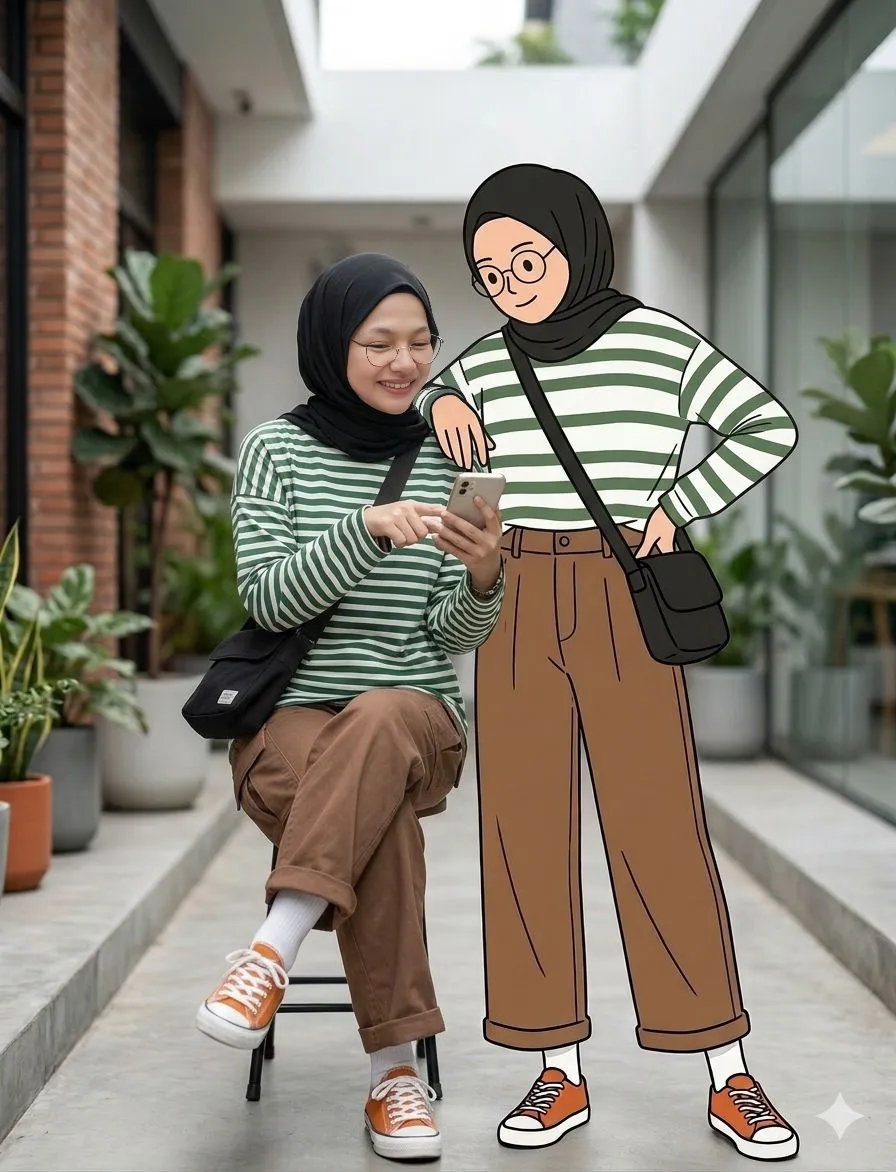
Generate a cinematic street fashion photograph that seamlessly blends a real person with their 2D cartoon illustrated twin. This prompt creates a warm, playful interaction between the photorealistic subject and a minimalist line-art version of themselves, both styled in matching casual outfits. Ideal for fashion editors, digital artists, and creative marketers looking to produce unique 8k editorial content that merges reality with illustration.
Generated Images

The Prompt
A cinematic street fashion scene featuring me with exact same facial and physical identity from the uploaded image standing together with my 2D cartoon illustrated version, both interacting naturally. i wearing round glasses, a green and white striped oversized t-shirt, loose brown shorts, white socks, orange sneakers, and a black crossbody bag. Standing beside me is my cartoon character version, drawn in a clean minimal line-art illustration style with flat colors, wearing the exact same outfit and hairstyle. we are standing close together with their arms around each other's shoulders like good friends. i am smiling confidently and giving a thumbs-up gesture with my free hand, while the cartoon version is making a playful peace sign with two fingers. The interaction feels warm, friendly, and playful, showing a connection between the real world and the illustrated world. Background: modern minimal street environment with plants and soft urban elements. Composition: editorial fashion photography mixed with illustration, ultra photorealistic human, clean cartoon illustration, perfect lighting balance, cinematic depth of field, 8k ultra detailed. ar -9:16 negative prompt blurry, distorted hands, extra fingers, duplicate faces, malformed body, incorrect anatomy, messy illustration, inconsistent clothing
How to Use
To customize this prompt for your own image, replace the descriptive details of the outfit with your own clothing. Change 'round glasses, a green and white striped oversized t-shirt, loose brown shorts, white socks, orange sneakers, and a black crossbody bag' to match your wardrobe. You can also modify the actions (thumbs-up, peace sign), the setting (e.g., 'busy city intersection' or 'rooftop garden'), or the art style of the illustration (e.g., 'watercolor sketch' or 'pop art comic').
Prompt Variations
A cinematic rooftop scene featuring me and my anime chibi-style illustrated version at golden hour. I am wearing a denim jacket, white t-shirt, and black jeans. My anime version has oversized eyes and a cute expression, wearing the same outfit. We are doing a 'hang loose' hand sign together, leaning against a railing with a city skyline behind us. Style: mixed photorealistic human and vibrant anime illustration, warm lighting, shallow depth of field, 8k.
Inside a vintage American diner, I am sitting at the counter next to my comic book version drawn in a retro pop art style with Ben-Day dots. I'm wearing a classic leather jacket and drinking a milkshake. My cartoon counterpart, wearing the same jacket, is winking at the camera and pointing at me. Style: photorealistic human mixed with vintage comic illustration, neon signs, checkered floor, 8k ultra detailed.
A rainy city street at night. I am holding an umbrella while my sketch version, drawn in rough pencil lines with subtle shading, stands beside me without an umbrella, looking playfully soaked. We are both wearing matching trench coats. The sketch character's lines look slightly loose and artistic, blending into the rainy atmosphere. Style: photorealistic human mixed with expressive pencil sketch, wet pavement reflections, cinematic lighting, 8k.
In a bright minimalist photo studio, I am standing confidently next to my graphic novel version. The graphic novel version is rendered in bold black inks and flat, vibrant colors with sharp, angular lines. We are both wearing futuristic streetwear. I'm looking directly at the camera, while my graphic novel self is looking away with a determined expression. Style: editorial fashion photography mixed with bold graphic novel art, clean white background, softbox lighting, 8k.
Inside a cozy, sunlit coffee shop, I am laughing with my watercolor illustrated version. I am wearing a cozy sweater and holding a coffee cup. My watercolor double, painted with soft washes of color and visible brushstrokes, is playfully trying to steal a sip from my cup. Style: photorealistic human mixed with soft watercolor illustration, warm ambient light, blurred background with bookshelves, 8k.
At a bustling night market, I am holding a stick of glowing cotton candy next to my neon doodle version. The doodle character is made of simple, glowing lines and flat neon colors, styled after light art. We are both wearing casual summer clothes. The doodle character is pointing excitedly at the food stalls. Style: photorealistic human mixed with neon line art, vibrant colors, bokeh lights in the background, 8k ultra detailed.
A quiet, serene park. I am sitting on a bench feeding pigeons next to my charcoal sketch version. The sketch version is drawn with rich, smudgy charcoal lines on a textured paper background, existing in the same space. We are both wearing simple, comfortable clothing. The sketch character is holding out a hand to a bird. Style: photorealistic human mixed with expressive charcoal drawing, soft natural daylight, shallow depth of field, 8k.
FAQ
- What AI image generators work best with this prompt?This prompt is optimized for advanced AI image generators that excel at photorealism and specific art styles, such as Midjourney, Stable Diffusion, or DALL-E 3. For best results, use a model fine-tuned on both photographic and illustrative data. The prompt's detailed description of the human and cartoon version helps these platforms understand the desired hybrid output.
- How can I use my own photo with this prompt?This prompt is designed to be used with image-to-image or 'upload image' features found in platforms like Midjourney (using image URLs) or Stable Diffusion (using img2img). First, upload your photo to the AI tool to get its URL or reference. Then, include that reference in your prompt (e.g., '--cref URL' in Midjourney) and use the detailed description of your outfit and actions to guide the AI in generating both you and your cartoon twin accurately.
- How can I improve the quality of the cartoon character in the output?To enhance the cartoon character, be very specific about the art style. This prompt uses 'clean minimal line-art illustration style with flat colors.' You can change this to styles like '3D Pixar render,' 'classic Disney animation style,' 'manga screentone,' or 'oil painting texture.' Adding the negative prompt terms like 'blurry, distorted hands, messy illustration' also helps ensure the cartoon version is clean and well-defined.
Related Prompts