Typographic Portrait AI Prompt for Face to Text Art
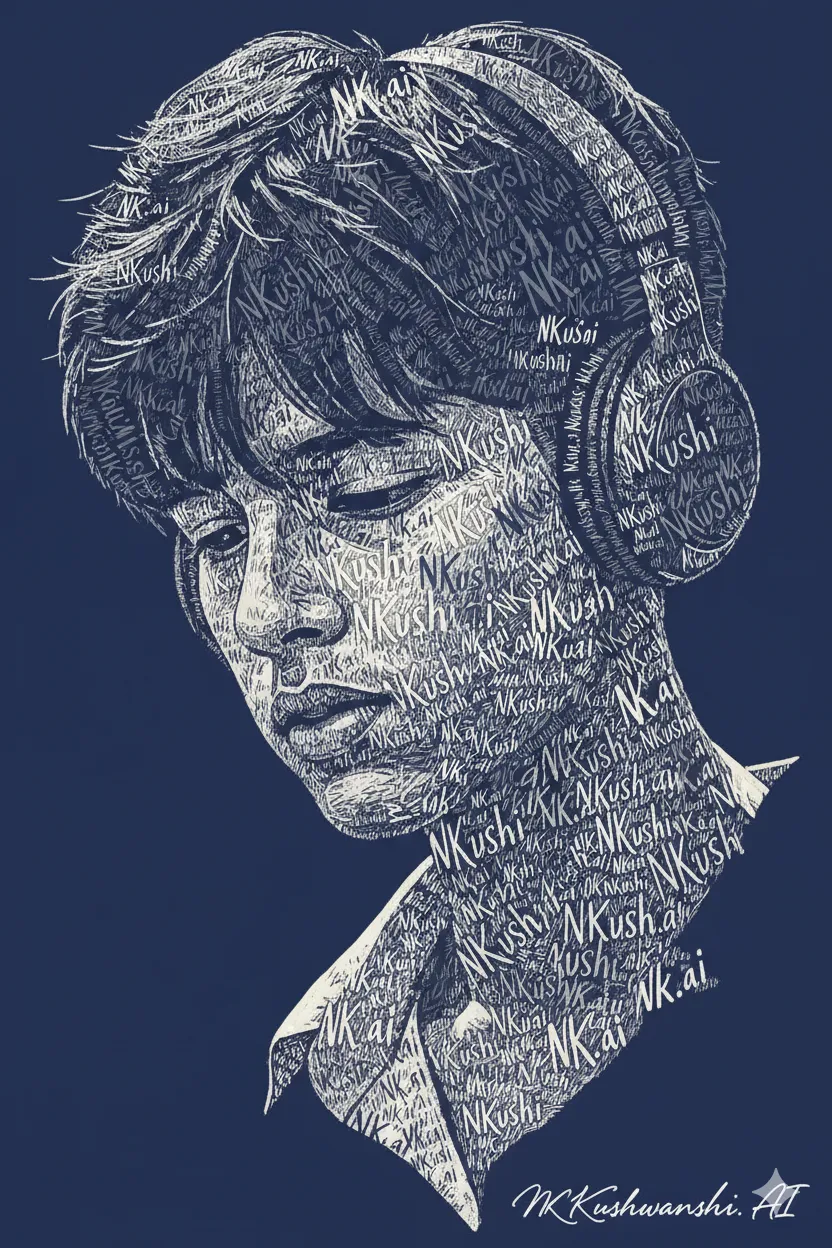
Generate a stunning typographic portrait from a face image. This prompt recreates a face entirely with repeated words and script typography, following the natural contours of the face with high contrast and a screen-print aesthetic.
Generated Images

The Prompt
Transform the provided face image into a highly detailed typographic portrait. Image Aspect ratio 9:16

Recreate the face entirely using repeated words and short phrases such as (NK.ai). The typography must precisely follow the natural contours, anatomy, and structure of the face, adapting accurately to the head’s direction, whether front-facing, three-quarter view, or full profile. cont...All facial features must be defined only through text placement, curvature, scale variation, and density. Do not use solid fills, shading blocks, gradients, or painted strokes. The portrait must be constructed purely from typography.

Give generous amount of negative space around the face.

Text flow must follow the natural structure of the face:
• Hair direction and texture
• Forehead curvature
• Eye sockets and eyelids
• Nose bridge and nostrils
cont...• Cheekbones and facial planes
• Lips and expression lines
• Jawline and chin
• Beard or skin texture
• Ear structure

Use elegant flowing script, hand-lettered, or brush-style typography. Vary font size and curvature to create depth and dimension. Dense overlapping text should form shadow areas. Lighter spacing should define highlights.

cont...Style and finish:
• White or light cream typography
• Deep navy or dark solid background
• High contrast
• Clean screen-print or engraved poster aesthetic
• Ultra-detailed, sharp, high-resolution
• Balanced composition with clear negative space
• Vector-like precision

Make the typography feel organic, sculptural, and seamlessly integrated with the facial anatomy.
How to Use
1. Copy the full prompt text. 2. Paste it into your AI image generator (like Midjourney, DALL-E 3, or Stable Diffusion). 3. Upload a clear, front-facing portrait photo as your reference image (often done by adding the image link or uploading directly in the tool). 4. Ensure the aspect ratio is set to 9:16 (portrait orientation). 5. Generate and upscale for the best detail.
Prompt Variations
1. 1. Gold on Midnight Blue
Best for a luxurious, regal aesthetic. Changes the text color from white/cream to metallic gold against a deep midnight blue background for an elegant poster feel.
Transform the provided face image into a highly detailed typographic portrait. Recreate the face entirely using repeated words such as (NK.ai) in metallic gold typography. The text must follow the natural contours and anatomy of the face. Use elegant flowing script fonts. Dense overlapping text forms shadow areas; lighter spacing defines highlights. Background is deep midnight blue. High contrast, clean screen-print aesthetic, ultra-detailed with generous negative space around the face. 9:16 aspect ratio.
2. 2. Vintage Newspaper Print
Ideal for a retro, historical look. Changes the background to off-white newsprint and the text to faded black ink, simulating an old engraved newspaper portrait.
Transform the provided face image into a typographic portrait with a vintage newspaper aesthetic. Recreate the face entirely using repeated black ink words on aged, off-white newsprint paper. The typography must follow the natural contours of the face. Use a mix of serif and hand-lettered fonts. Varying text density creates shading. Background has subtle texture of old paper. High contrast, engraved look with generous negative space. 9:16 aspect ratio.
3. 3. Bold Sans-Serif Modernism
Great for a contemporary, graphic design feel. Switches from elegant script to bold, geometric sans-serif fonts for a sharp, modernist portrait.
Transform the provided face image into a typographic portrait using bold, geometric sans-serif fonts. Recreate the face entirely with repeated words such as (NK.ai) in white. The text must follow the natural contours of the face precisely, using scale and density for shading. Background is solid deep navy. Clean, minimalist, high-contrast, ultra-detailed with a modern screen-print aesthetic and generous negative space. 9:16 aspect ratio.
4. 4. Warm Sepia Tone
Perfect for a romantic, vintage photograph feel. Changes the color palette to warm sepia text on a cream background, softening the contrast.
Transform the provided face image into a typographic portrait with a warm sepia tone. Recreate the face using repeated words in a warm brown ink on a light cream background. Use elegant flowing script typography that follows the facial contours. Dense text creates shadow areas. The overall look is soft, romantic, and reminiscent of old photographs. High detail, clean engraved aesthetic with generous negative space. 9:16 aspect ratio.
5. 5. Three-Quarter View Mastery
Specifically designed for a three-quarter head orientation. Emphasizes the perspective shift and plane changes in the face with typographic flow.
Transform the provided face image into a highly detailed typographic portrait, focusing on a three-quarter view. Recreate the face using repeated words such as (NK.ai) in white script typography. The text flow must masterfully follow the perspective shift of the face, accurately wrapping around the cheekbones, far eye socket, and the turning plane of the nose. Background is deep navy. High contrast, ultra-detailed, vector-like precision with generous negative space. 9:16 aspect ratio.
6. 6. Abstract Negative Space Portrait
For an artistic, minimalist approach. Inverts the concept: the face is defined by the negative space, with text filling only the background.
Transform the provided face image into an abstract typographic portrait. The face itself is defined by the negative space, left as the deep navy background. The area around the face is filled with dense white typography, using words such as (NK.ai), that traces the silhouette and contours of the face from the outside. High contrast, clean screen-print aesthetic, ultra-detailed with the face shape emerging from the text. 9:16 aspect ratio.
7. 7. Grunge Screen-Print Texture
Best for a punk or street art vibe. Adds a distressed, gritty texture to the white typography and dark background, mimicking a worn screen print.
Transform the provided face image into a typographic portrait with a grunge screen-print aesthetic. Recreate the face using white hand-lettered typography with a slightly distressed, gritty texture on a deep navy, also textured, background. The text follows the natural contours of the face. Varying density creates depth. The overall look is raw, artistic, and ultra-detailed with a worn, printed feel and generous negative space. 9:16 aspect ratio.
FAQ
- What is a typographic portrait?A typographic portrait is an image of a person's face created entirely from text, words, or letters. The text is arranged to follow the facial contours, forming the features through density and placement instead of pixels or paint.
- Which AI tools work best with this prompt?Midjourney and Stable Diffusion typically handle these complex, structural prompts best, especially when using an image as a reference. DALL-E 3 can also produce good results, but may require more simplification.
- Can I use my own photo?Yes, this prompt is designed to be used with an image reference. You upload your own face photo, and the AI uses that as the basis for the typographic reconstruction.
Related Prompts