How to Create a Side Profile Portrait with Realistic Blue Fire Hair
Generate an ultra-realistic side profile portrait where your hair is replaced with realistic blue fire that illuminates your face, using cinematic lighting and shallow depth of field.
Generated Images

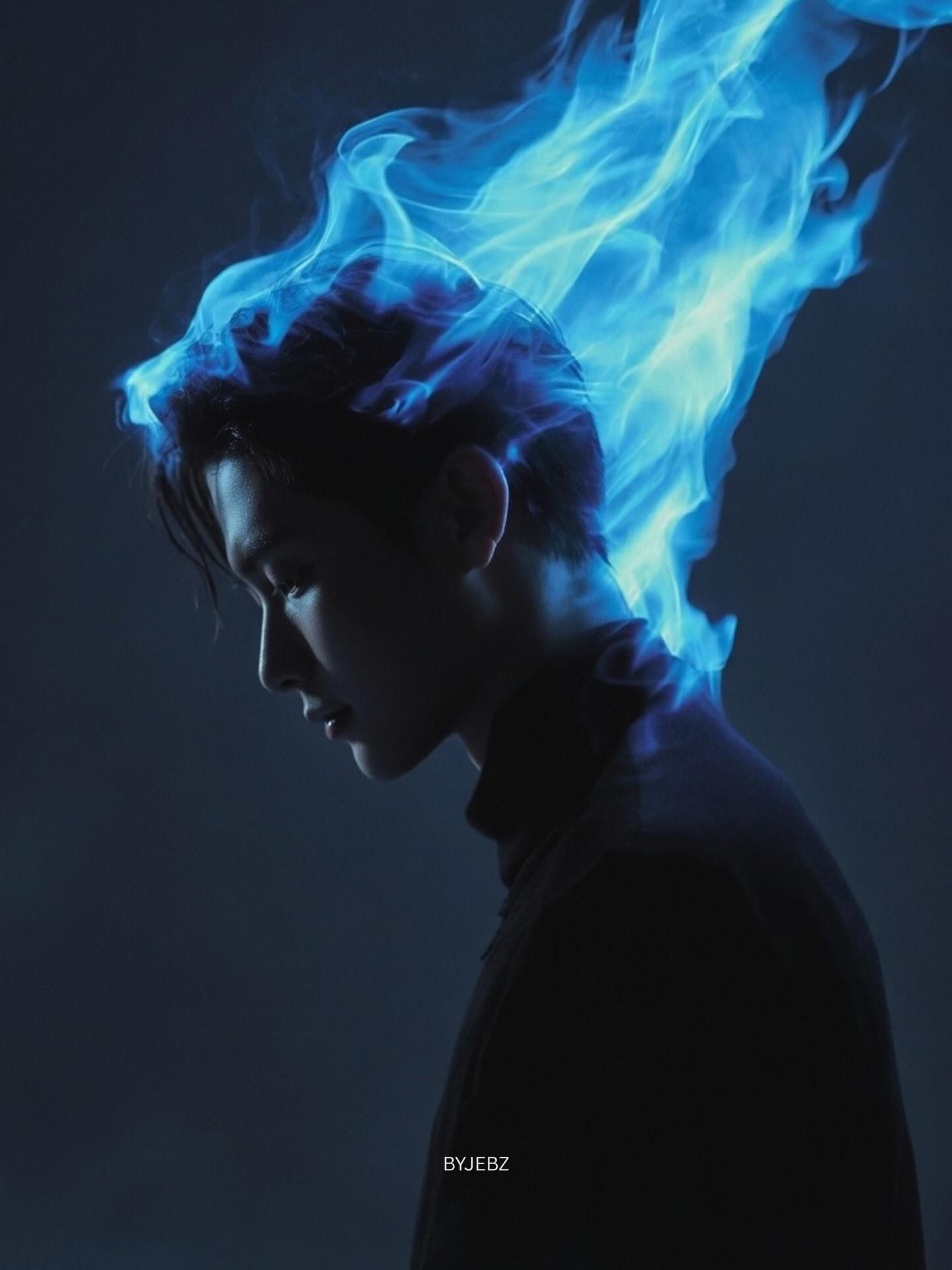
The Prompt
Use my photo as base. Keep my real face and proportions 100% unchanged. Side profile, head slightly lowered. Replace my hair with realistic blue fire following the natural hairline and head shape. Deep blue at the base fading to cyan at the tips, subtle transparency and light smoke. The flame acts as the main light source, creating soft blue rim lighting on my face edges Dark navy gradient background, cinematic lighting, natural skin texture (no smoothing), ultra-realistic, 85mm lens look, shallow depth of field, high detail, ar-9:16
How to Use
Start by uploading a clear side profile photo of yourself to your AI image generator. The reference image is absolutely critical for this prompt because it demands that your face and proportions remain '100% unchanged.' Choose a photo with good lighting where your hairline is clearly visible, as the AI needs to understand where your natural hair begins and ends to replace it convincingly with flames. Copy the prompt exactly as written and paste it alongside your uploaded image. If your platform supports image prompts, make sure to select your photo as the primary reference before adding the text. Some tools work better when you provide the image URL first, then the text prompt. Generate multiple variations and examine each one carefully. The key elements to check are: does your face still look exactly like you, has the blue fire been applied only to the hair area following your natural hairline, and does the lighting on your face come from the flames as described. The flame should be the main light source, creating soft blue rim lighting along the edges of your face. If the fire doesn't blend naturally with your hairline, try using inpainting tools to refine the transition area. Some platforms allow you to select the hair region and regenerate just that part while keeping your face locked. Pay attention to the color fade from deep blue at the base to cyan at the tips, and look for the subtle smoke effect that adds realism.
Prompt Variations
Use my photo as base. Keep my real face and proportions 100% unchanged. Side profile, head slightly lowered. Replace my hair with realistic violet fire following the natural hairline and head shape. Deep violet at the base fading to bright magenta at the tips, subtle transparency and light smoke. The flame acts as the main light source, creating soft violet rim lighting on my face edges. Dark navy gradient background, cinematic lighting, natural skin texture (no smoothing), ultra-realistic, 85mm lens look, shallow depth of field, high detail, ar-9:16
Use my photo as base. Keep my real face and proportions 100% unchanged. Side profile, head slightly lowered. Replace my hair with realistic crimson red fire following the natural hairline and head shape. Deep red at the base fading to bright orange at the tips, with subtle glowing embers and light smoke. The flame acts as the main light source, creating a warm red-orange rim lighting on my face edges. Dark charcoal gradient background, cinematic lighting, natural skin texture (no smoothing), ultra-realistic, 85mm lens look, shallow depth of field, high detail, ar-9:16
Use my photo as base. Keep my real face and proportions 100% unchanged. Side profile, head slightly lowered. Replace my hair with realistic crackling electric blue plasma following the natural hairline and head shape. Deep electric blue at the base fading to bright white-blue at the tips, with subtle electrical discharge and light smoke. The plasma acts as the main light source, creating sharp blue-white rim lighting on my face edges. Dark space gradient background with faint stars, cinematic lighting, natural skin texture (no smoothing), ultra-realistic, 85mm lens look, shallow depth of field, high detail, ar-9:16
Use my photo as base. Keep my real face and proportions 100% unchanged. Side profile, head slightly lowered. Replace my hair with realistic golden fire following the natural hairline and head shape. Deep gold at the base fading to bright yellow at the tips, subtle transparency and light smoke. The flame acts as the main light source, creating a warm golden rim lighting on my face edges. Dark sepia gradient background, cinematic lighting, natural skin texture (no smoothing), ultra-realistic, 85mm lens look, shallow depth of field, high detail, ar-9:16
Use my photo as base. Keep my real face and proportions 100% unchanged. Side profile, head slightly lowered. Replace my hair with a mix of smoldering embers and realistic swirling smoke, with faint deep blue flames at the core, following the natural hairline and head shape. The effect features subtle transparency and heavy, dramatic light smoke. The embers act as the main light source, creating a soft, dying orange-red rim lighting on my face edges. Dark, ashy grey gradient background, cinematic lighting, natural skin texture (no smoothing), ultra-realistic, 85mm lens look, shallow depth of field, high detail, ar-9:16
Use my photo as base. Keep my real face and proportions 100% unchanged. Side profile, head slightly lowered. Replace my hair with realistic, sharp ice crystals and delicate frost formations following the natural hairline and head shape. Deep blue ice at the base fading to clear, crystalline tips, with subtle light refraction and frozen particles. The ice acts as the main light source, creating a soft, cool blue-white rim lighting on my face edges. Dark navy gradient background, cinematic lighting, natural skin texture (no smoothing), ultra-realistic, 85mm lens look, shallow depth of field, high detail, ar-9:16
Use my photo as base. Keep my real face and proportions 100% unchanged. Side profile, head slightly lowered. Replace my hair with realistic blue fire that swirls upward and outward in dramatic, dynamic spirals and tendrils, following the natural hairline and head shape. Deep blue at the base fading to cyan at the tips, with subtle transparency and trails of light smoke. The swirling flame acts as the main light source, creating soft blue rim lighting on my face edges. Dark navy gradient background, cinematic lighting, natural skin texture (no smoothing), ultra-realistic, 85mm lens look, shallow depth of field, high detail, ar-9:16
FAQ
- How do I ensure my face stays exactly the same and doesn't change?Use the highest quality reference photo possible and make sure your platform supports strong image prompting. Some tools like Midjourney have a 'image weight' parameter that lets you prioritize the reference image over the text prompt.
- What if the fire doesn't follow my natural hairline correctly?Try generating multiple variations or use inpainting to manually refine the hairline area. You can also add 'exactly following the hairline, no flames on forehead or skin' to reinforce the instruction.
- Why specify 'no smoothing' in the prompt?AI generators sometimes automatically smooth skin, making it look plastic or airbrushed. 'No smoothing' tells the AI to preserve natural skin texture, pores, and subtle imperfections for a more realistic, photographic result.
Related Prompts


