Hyper-Realistic Cinematic Portrait with Spotify Playlist Interface Overlay
This prompt generates a hyper-realistic, dreamlike portrait featuring an individual bathed in warm amber sunlight against a neutral cream background. The subject is styled in an oversized earthy brown shirt with silver jewelry and dark sunglasses. What makes this generation truly unique is the integrated Spotify-style vertical playlist overlay positioned on the left side of the frame. The UI elements include album icons, track titles in classic Spotify green, and clean white artist text, creating a perfect blend of high-end editorial photography and modern digital music interfaces.
Generated Images

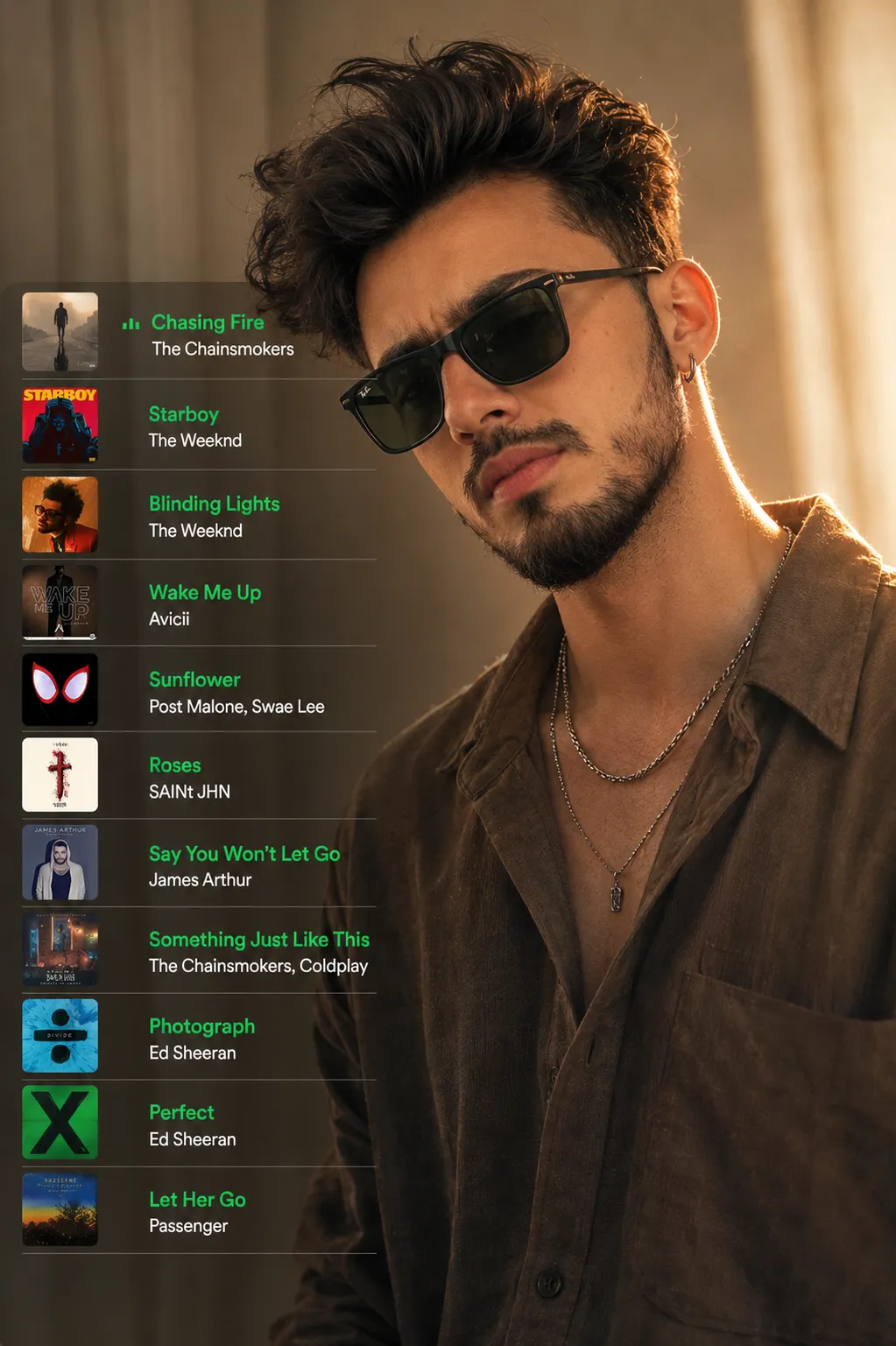
The Prompt
Create a hyper-realistic, dreamlike cinematic portrait using the uploaded photo as the subject reference.subject, wears an earthy brown oversized soft-textured shirt, layered silver necklaces, and a single earring. subject wears dark sunglasses and gently lowers head. Warm amber sunlight (soft, directional) lights face and right shoulder, creating a natural rim and soft highlight against a neutral cream background. Keep skin tones natural and textures detailed.Add a Spotify-style vertical playlist overlay on the left third of the frame (overlapping the subject slightly). Playlist details: each row contains a small square album icon (rounded corners), then a track title in Spotify green #1DB954 (bold, slightly larger), and beneath it the artist line in white #FFFFFF (smaller, clean sans-serif). Place thin white divider lines (1–2 px) between rows. Include a small green play icon or waveform to the left of the playing track title. ar 9:16
How to Use
To use this prompt effectively, copy and paste the entire text into your preferred image generator like Gemini, Midjourney, or DALL-E. You can easily customize the result by changing the clothing description from an earthy brown shirt to something that matches your own aesthetic. Adjust the UI elements by specifying different hex codes if you prefer a different music app vibe, such as Apple Music. You can also modify the lighting conditions, swapping the warm amber sunlight for cool neon tones to completely shift the mood of the final portrait.
Prompt Variations
Create a hyper-realistic cyberpunk portrait using the uploaded photo as the subject reference. The subject wears a sleek black tactical jacket and glowing visor. Cool blue and magenta neon lighting illuminates the face against a rainy, dark cityscape background. Add a futuristic vertical music player overlay on the right third of the frame. Playlist details: glowing holographic track titles in bright cyan, artist names in pure white, and a glitching waveform graphic next to the playing song. ar 9:16
Create a hyper-realistic bright editorial portrait using the uploaded photo as the subject reference. The subject wears a crisp white turtleneck and delicate gold jewelry. Soft, diffused natural daylight illuminates the face evenly against a pure white background. Add an Apple Music-style vertical playlist overlay on the left third of the frame. Playlist details: blurred glassmorphism background, rounded album art, dark grey track titles (bold), and light grey artist names. Include a minimalist pink play icon next to the active track. ar 9:16
Create a realistic 35mm film portrait using the uploaded photo as the subject reference. The subject wears a retro mustard yellow corduroy jacket and aviator glasses. Warm, nostalgic golden hour lighting creates a lens flare against a wood-paneled background. Add a retro typography tracklist overlay on the left third of the frame. Playlist details: typewriter-style font for track titles in faded black, artist names in brown, with thin dashed divider lines. Include a small vinyl record icon next to the playing track. Add heavy film grain. ar 9:16
Create a moody, high-contrast realistic portrait using the uploaded photo as the subject reference. The subject wears a distressed vintage band tee, heavy silver chains, and dark eyeliner. Harsh overhead spotlighting creates dramatic shadows against a dark textured concrete background. Add a dark mode vertical playlist overlay on the left third of the frame. Playlist details: blood-red track titles (bold, jagged font), artist names in muted grey. Thin dark crimson divider lines. Include a small skull or cross icon next to the playing track. ar 9:16
Create a hyper-realistic ethereal fantasy portrait using the uploaded photo as the subject reference. The subject wears a flowing silk white gown and a delicate floral crown. Soft pastel pink and blue ethereal lighting illuminates the face against a hazy, misty garden background. Add an elegant vertical music playlist overlay on the left third of the frame. Playlist details: ornate serif font for track titles in gold, artist names in soft silver. Thin elegant divider lines with filigree details. Include a small golden treble clef next to the playing track. ar 9:16
Create a hyper-realistic, cozy room portrait using the uploaded photo as the subject reference. The subject wears an oversized pastel hoodie and oversized headphones, looking thoughtfully off-camera. Warm, soft light from a desk lamp and glowing computer screen lights the face against a background filled with plants and posters. Add a retro 8-bit pixel art style vertical playlist overlay on the left third of the frame. Playlist details: pixelated track titles in pale yellow, artist names in light blue. Include a small pixelated cassette icon next to the playing track. ar 9:16
Create a hyper-realistic, high-energy fitness portrait using the uploaded photo as the subject reference. The subject wears a sleek black compression shirt and is lightly sweating. Cool, dramatic gym lighting with a subtle green rim light highlights the subject's physique against a blurred industrial gym background. Add a bold, sporty vertical playlist overlay on the left third of the frame. Playlist details: track titles in electric neon yellow (heavy, slanted font), artist names in crisp white. Thick solid white divider lines. Include a glowing play triangle next to the active track. ar 9:16
FAQ
- How can I change the color of the track titles?You can easily modify the color by replacing the hex code in the prompt. For example, swap the Spotify green #1DB954 with #FF0000 for bright red text.
- Does the prompt work well without providing a reference photo?Yes, it will work independently. If you do not upload a reference photo, simply remove the phrase 'using the uploaded photo as the subject reference' and the AI will generate a unique character based on the clothing descriptions.
- Why does the text in the music player look garbled or misspelled?AI image generators sometimes struggle with rendering precise text. To fix this, try generating the image a few times, or use an AI model specifically trained for text generation like Midjourney v6 or DALL-E 3.
Related Prompts


