How to Create a Cinematic Motion Blur Subway Portrait
Learn how to generate a moody, cinematic portrait featuring a sharp subject standing still amidst the chaotic motion blur of a crowded subway platform. Perfect for capturing introspective, urban photography with warm tungsten lighting.
Generated Images

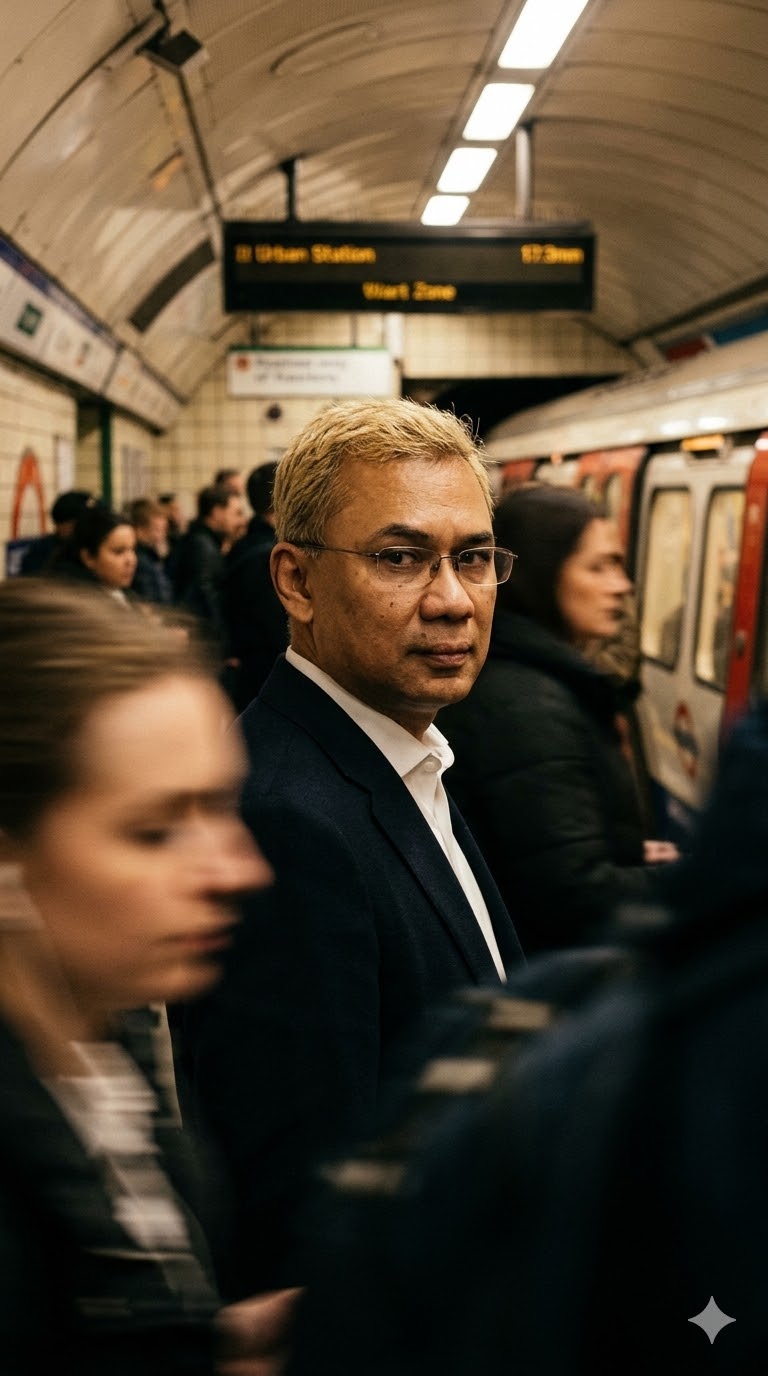
The Prompt
Use reference photo to create a cinematic portrait of me with exact same identity from the uploaded image standing on a crowded subway platform, commuters rushing around me as blurred streaks of movement, i turns my head toward the camera with a quiet, introspective expression, warm tungsten station lighting, dramatic shadows, shallow depth of field, motion blur surrounding a sharp subject, natural skin texture,, cinematic film look, shot on 85mm lens, moody urban atmosphere ar 9:16
How to Use
To customize this prompt, change the environment from a 'crowded subway platform' to a 'busy city intersection' or 'airport terminal'. You can alter the lighting by swapping 'warm tungsten station lighting' with 'cool neon streetlights' or 'bright daylight'. Adjust the subject's mood by changing 'quiet, introspective expression' to 'confident smile' or 'determined gaze'.
Prompt Variations
1. 1. Rainy Cyberpunk City Crossing
Transforms the subway scene into a futuristic, rain-slicked cyberpunk street with neon lighting.
Use reference photo to create a cinematic portrait of me with exact same identity from the uploaded image standing on a crowded cyberpunk city crossing in the rain, citizens rushing around me as blurred streaks of movement, i turns my head toward the camera with a quiet, introspective expression, vibrant neon pink and blue street lighting, dramatic shadows, shallow depth of field, motion blur surrounding a sharp subject, natural skin texture,, cinematic film look, water droplets, shot on 85mm lens, moody futuristic atmosphere ar 9:16
2. 2. Busy Airport Terminal
Moves the subject to a bright, modern airport terminal filled with rushing travelers.
Use reference photo to create a cinematic portrait of me with exact same identity from the uploaded image standing in a massive modern airport terminal, travelers with luggage rushing around me as blurred streaks of movement, i turns my head toward the camera with a quiet, introspective expression, bright cool daylight streaming through glass windows, soft shadows, shallow depth of field, motion blur surrounding a sharp subject, natural skin texture,, cinematic film look, shot on 85mm lens, sleek travel atmosphere ar 9:16
3. 3. Vibrant Asian Night Market
Places the subject in a bustling night market illuminated by warm lanterns and food stalls.
Use reference photo to create a cinematic portrait of me with exact same identity from the uploaded image standing in a bustling Asian night market, shoppers and vendors rushing around me as blurred streaks of movement, i turns my head toward the camera with a quiet, introspective expression, warm glowing paper lantern lighting, dramatic shadows, shallow depth of field, motion blur surrounding a sharp subject, natural skin texture,, cinematic film look, shot on 85mm lens, vibrant cultural atmosphere ar 9:16
4. 4. Snowy Winter Sidewalk
Changes the setting to a cold, snowy city sidewalk with pedestrians bundled in winter coats.
Use reference photo to create a cinematic portrait of me with exact same identity from the uploaded image standing on a snowy New York sidewalk, pedestrians in winter coats rushing around me as blurred streaks of movement, i turns my head toward the camera with a quiet, introspective expression, cold blue streetlamp lighting, dramatic shadows, shallow depth of field, motion blur surrounding a sharp subject, falling snow, natural skin texture,, cinematic film look, shot on 85mm lens, freezing moody atmosphere ar 9:16
5. 5. Grand Historic Train Station
Sets the scene in a majestic, classic train station with dramatic sunbeams piercing the hall.
Use reference photo to create a cinematic portrait of me with exact same identity from the uploaded image standing in a grand historic train station hall, commuters rushing around me as blurred streaks of movement, i turns my head toward the camera with a quiet, introspective expression, dramatic morning sunbeams piercing through tall windows, golden hour lighting, shallow depth of field, motion blur surrounding a sharp subject, natural skin texture,, cinematic film look, shot on 85mm lens, majestic vintage atmosphere ar 9:16
6. 6. Chaotic Stock Exchange Floor
Puts the subject in the middle of a frantic stock trading floor with intense energy.
Use reference photo to create a cinematic portrait of me with exact same identity from the uploaded image standing on a chaotic stock exchange trading floor, frantic brokers rushing around me as blurred streaks of movement, i turns my head toward the camera with a quiet, introspective expression, harsh fluorescent office lighting, dramatic shadows, shallow depth of field, motion blur surrounding a sharp subject, flying papers, natural skin texture,, cinematic film look, shot on 85mm lens, intense corporate atmosphere ar 9:16
7. 7. Festival Concert Crowd
Places the subject in the middle of a dancing, moving crowd at an outdoor music festival.
Use reference photo to create a cinematic portrait of me with exact same identity from the uploaded image standing in the middle of a massive music festival crowd, dancing fans rushing and jumping around me as blurred streaks of movement, i turns my head toward the camera with a quiet, introspective expression, dynamic stage laser lighting and smoke, dramatic shadows, shallow depth of field, motion blur surrounding a sharp subject, natural skin texture,, cinematic film look, shot on 85mm lens, euphoric party atmosphere ar 9:16
FAQ
- How do I ensure the subject remains sharp while the background is blurry?The key is keeping the phrases 'motion blur surrounding a sharp subject' and 'shallow depth of field' in your prompt. These specific keywords instruct the AI to freeze the central figure while applying movement to the background elements.
- Can I use this prompt in a horizontal format?Yes. While the prompt specifies 'ar 9:16' for a vertical portrait, you can easily change this to 'ar 16:9' or 'ar 3:2' if you are using Midjourney to create a wide, cinematic landscape shot.
- How do I change the lighting of the portrait?Locate the phrase 'warm tungsten station lighting' in the prompt and replace it with your desired lighting style. For example, use 'golden hour sunlight', 'cool blue moonlight', or 'harsh fluorescent lighting' to instantly change the mood of the image.
Related Prompts