How to Create a High Fashion Motion Blur City Portrait
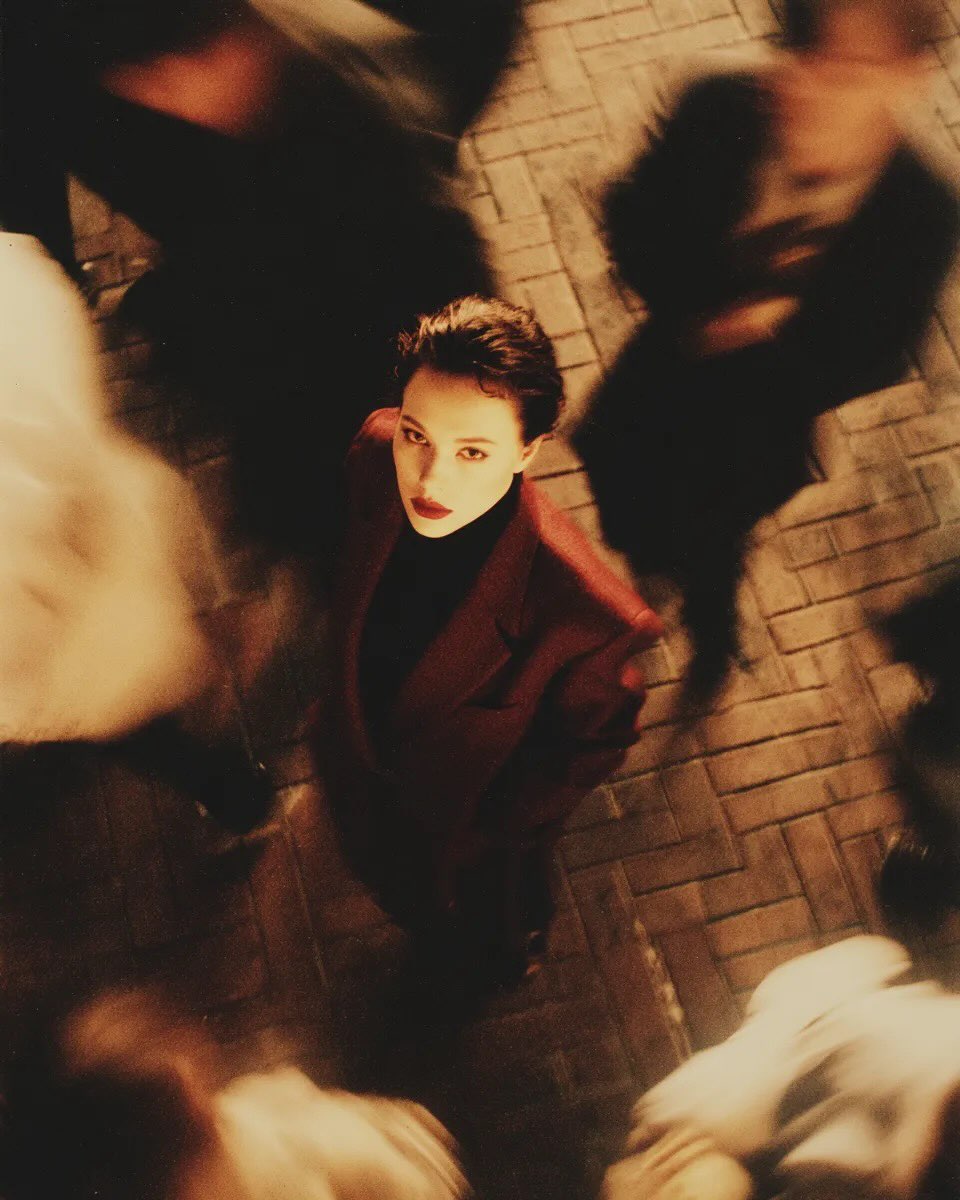
Learn how to generate a striking high-fashion editorial photo featuring a sharp, still subject surrounded by a motion-blurred crowd. This AI image prompt uses a moody 35mm film aesthetic and an overhead camera angle to create a cinematic, long-exposure look perfect for urban streetwear and conceptual fashion photography.
Generated Images

The Prompt
High fashion editorial overhead shot of me standing still on a brick city sidewalk, wearing a dark red oversized blazer. Motion-blurred crowd rushes past around me. Moody lighting, 35mm film look, shallow depth of field, sharp focus on me. --ar 4:5
How to Use
To customize this prompt for your specific needs, try modifying the subject's clothing and the environment. You can change the 'dark red oversized blazer' to a 'classic beige trench coat' or 'neon cyberpunk jacket'. To alter the setting, swap 'brick city sidewalk' with a 'busy subway terminal' or 'rainy Tokyo crossing'. If you want a different perspective, replace 'overhead shot' with 'low angle shot' or 'eye-level perspective'. For personalized results, use your AI tool's image-to-image or character reference features along with the text prompt to insert your own likeness.
Prompt Variations
High fashion editorial overhead shot of me standing still on a rainy cyberpunk city street, wearing a glowing neon trench coat. Motion-blurred crowd with glowing umbrellas rushes past around me. Moody neon lighting, wet pavement reflections, 35mm film look, shallow depth of field, sharp focus on me. --ar 4:5
High fashion editorial overhead shot of me standing still in a busy underground subway station, wearing a sharp charcoal tailored suit. Motion-blurred commuters rush past around me toward the trains. Moody fluorescent lighting, 35mm film look, shallow depth of field, sharp focus on me. --ar 4:5
High fashion editorial overhead shot of me standing still on a snowy city crosswalk, wearing a long black wool winter coat. Motion-blurred crowd rushing past around me in a snowstorm. Moody overcast lighting, falling snow, 35mm film look, shallow depth of field, sharp focus on me. --ar 4:5
High fashion editorial overhead shot of me standing still on a sunlit city boulevard, wearing casual designer streetwear. Motion-blurred crowd rushes past around me. Golden hour lighting, warm sun flares, long shadows, 35mm film look, shallow depth of field, sharp focus on me. --ar 4:5
High fashion editorial overhead shot of me standing still in a grand minimalist museum hall with marble floors, wearing an avant-garde black silk outfit. Motion-blurred art patrons rush past around me. Soft diffused natural lighting, 35mm film look, shallow depth of field, sharp focus on me. --ar 4:5
High fashion editorial overhead shot of me standing still in a narrow, bustling neon night market alley, wearing an embroidered silk bomber jacket. Motion-blurred shoppers and street food vendors rush past around me. Moody colorful lantern lighting, 35mm film look, shallow depth of field, sharp focus on me. --ar 4:5
High fashion editorial overhead shot of me standing still in a grand 1970s train station concourse, wearing a vintage mustard yellow corduroy suit. Motion-blurred travelers with vintage luggage rush past around me. Moody retro lighting, heavy grain 35mm film look, shallow depth of field, sharp focus on me. --ar 4:5
FAQ
- How do I ensure the motion blur effect looks realistic?To achieve a realistic motion blur, it is essential to contrast the movement with a sharply focused subject. Keywords like 'motion-blurred crowd', 'long exposure', and 'sharp focus on me' instruct the AI to mimic a camera's slow shutter speed effect.
- What AI generator is best for creating a 35mm film look?Midjourney is highly recommended for achieving photorealistic, cinematic styles. Its V6 model is particularly excellent at rendering the subtle grain, moody lighting, and color grading associated with authentic 35mm analog film.
- Can I change the camera angle from an overhead shot?Yes! The camera angle in this prompt is highly flexible. You can replace 'overhead shot' with 'low angle shot' to make the subject look more powerful, or use 'eye-level perspective' for a more intimate, traditional portrait style.
Related Prompts