CCTV Style Security Footage AI Prompt with Identity Preservation
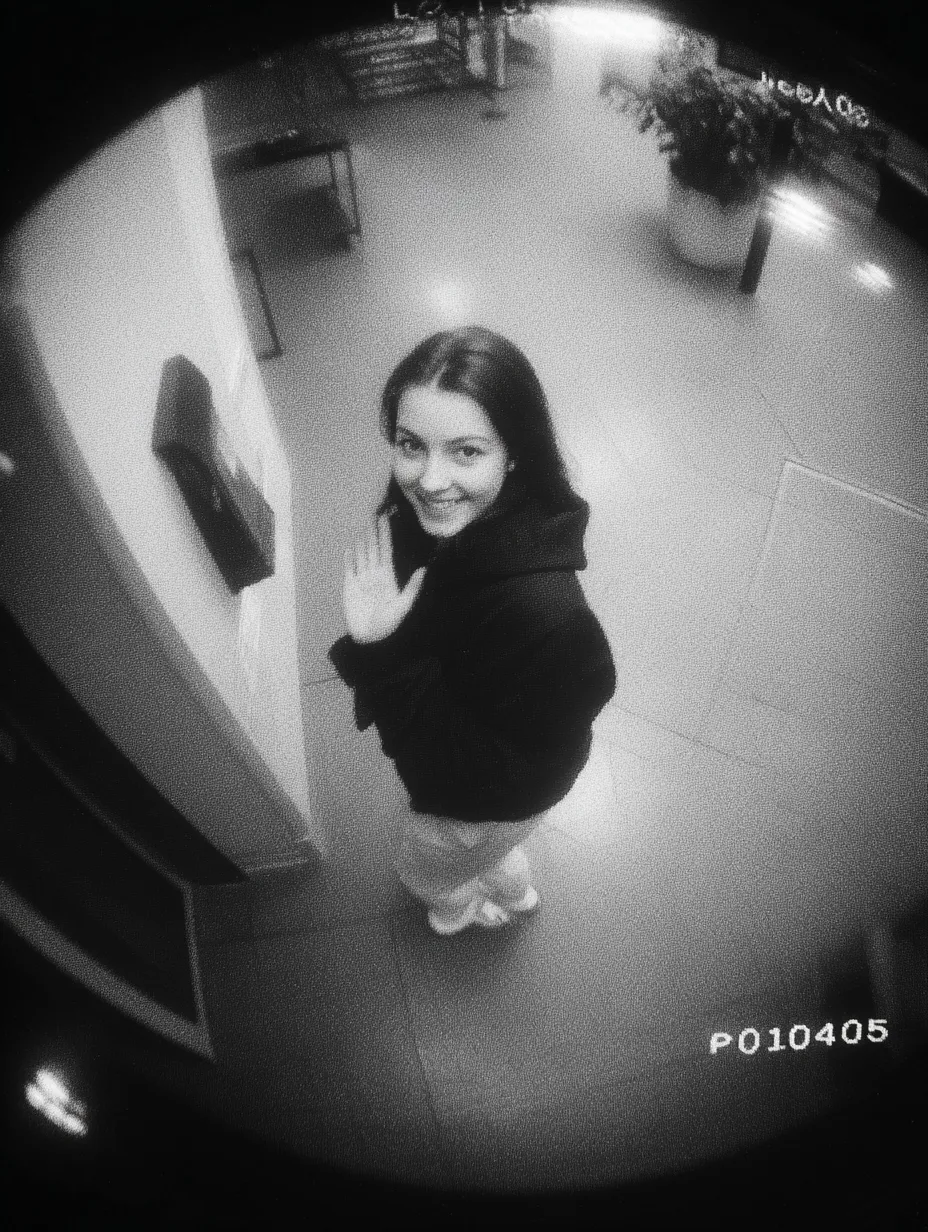
This prompt generates a realistic CCTV-style security camera still or short clip featuring the exact facial identity of the user uploaded in a reference image. The scene places the subject in an indoor hallway or lobby, walking naturally past a high-angle surveillance camera. The subject looks up directly at the lens with a bright, friendly smile while casually waving, creating a candid and confident appearance. The visual aesthetic strictly mimics authentic security footage with specific technical artifacts: a slightly distorted wide-angle lens perspective, low resolution output, desaturated or monochrome color grading, and a visible timestamp overlay in the corner. The prompt also includes subtle scan lines, digital compression artifacts, motion blur on the waving hand, and grainy noise to ensure the result does not look like a polished photograph but rather an unpolished, documentary-style security still. The lighting is described as uneven with harsh overhead shadows, reinforcing the utilitarian and unglamorous nature of real surveillance systems while strictly preserving the user's natural facial geometry and body type.
Generated Images

The Prompt
a CCTV-style surveillance footage of me with exact same facial and physical identity from uploaded image walking past a security camera, looking up at the camera with a bright friendly smile, waving my hand casually, candid and natural movement, slightly confident model-like appearance, casual modern outfit, indoor public space (hallway or lobby), high angle security camera perspective, slightly distorted wide-angle lens, low resolution, monochrome or desaturated color, timestamp overlay, subtle scan lines, digital noise, compression artifacts, motion blur, uneven lighting, harsh shadows, grainy texture, authentic security camera aesthetic, unpolished and documentary feel, --ar 9:16
How to Use
To get the best results with this prompt, begin by uploading a clear reference photo of your face to the AI image generator before pasting the text. This ensures the model adheres to your exact identity rather than generating a generic person. The prompt is designed for a vertical 9:16 aspect ratio, perfect for phone screens or social media stories. If you want to adjust the environment, you can swap 'hallway or lobby' with 'parking garage,' 'elevator bank,' or 'convenience store aisle' to change the mood while keeping the security aesthetic. For a different era, you might add 'VHS tape degradation' or '2000s CCTV grain' to the prompt. If the AI makes the image look too sharp or clean, emphasize 'standard definition video' or '480p resolution' in your variations. Avoid using terms like 'portrait mode' or 'soft focus' as they contradict the harsh, documentary nature of surveillance footage. The timestamp overlay is usually generated automatically by most models when 'CCTV footage' is specified, but if it doesn't appear, you can add a specific line like 'white digital timestamp in top right corner reading 04-22-2026 14:37:52.'
Prompt Variations
a CCTV-style surveillance footage of me with exact same facial and physical identity from uploaded image standing in an elevator waiting area, looking down at a smartphone screen, neutral bored expression, slightly slouched posture, casual modern outfit with a jacket, indoor corporate lobby, high angle security camera perspective mounted in corner, slightly distorted wide-angle fisheye lens, low resolution 480p, monochrome greenish-grey color cast, timestamp overlay in white blocky font, subtle scan lines rolling down screen, digital compression artifacts around edges, motion blur on hand scrolling phone, harsh overhead fluorescent lighting, deep shadows under eyes and chin, grainy texture, authentic security camera aesthetic, unpolished surveillance still, --ar 9:16
a CCTV-style surveillance footage of me with exact same facial and physical identity from uploaded image walking through a dark parking garage, looking straight ahead not at camera, serious focused expression, hands in pockets, casual hoodie and jeans outfit, concrete pillars and parked cars in background, high angle security camera perspective mounted on ceiling beam, slightly distorted wide-angle lens, very low light sensor noise, heavy digital grain, monochrome grey with crushed blacks, timestamp overlay with flickering seconds counter, visible compression macroblocking in dark areas, subtle motion blur on legs moving, uneven sodium vapor lighting casting long harsh shadows, authentic nighttime security camera aesthetic, unpolished and gritty documentary feel, --ar 9:16
a CCTV-style surveillance footage of me with exact same facial and physical identity from uploaded image entering a small retail store through a glass door, looking up and slightly to the side at a door chime or sensor, small polite smile, casual modern outfit with a tote bag, indoor entrance area with merchandise racks in background, high angle security camera perspective above door frame, slightly distorted barrel lens distortion, low resolution with edge blur, desaturated slightly warm color cast from interior lights, timestamp overlay at bottom of frame, subtle scan lines, digital noise in shadow areas of face, slight motion blur on door swinging open, uneven lighting mix of exterior daylight and interior fluorescents, authentic retail security camera aesthetic, unpolished documentary feel, --ar 9:16
a CCTV-style surveillance footage of me with exact same facial and physical identity from uploaded image standing on a concrete stairwell landing, one hand resting on metal railing, looking up directly at security camera with a tired small smile, casual comfortable clothes, industrial concrete walls and steps in background, high angle security camera perspective looking down from upper floor, slightly distorted wide-angle lens, low resolution monochrome, harsh emergency backup lighting creating stark shadows on face, timestamp overlay in military time format, subtle scan lines and vertical hold glitch, compression artifacts heavy on concrete texture, motion blur minimal but subject slightly soft focus, authentic fire escape security camera aesthetic, unpolished and raw documentary feel, --ar 9:16
a CCTV-style surveillance footage of me with exact same facial and physical identity from uploaded image walking down a long carpeted hotel hallway away from camera, turning head to look back over shoulder with a slight smirk, casual travel outfit with luggage bag rolling behind, hotel room doors and sconce lighting lining walls, high angle security camera perspective mounted at end of hallway, slightly distorted wide-angle lens creating stretched floor effect, low resolution 720p, desaturated warm tones from wall sconces, timestamp overlay in bottom right, subtle scan lines and pixelation on face due to distance, digital noise prominent in darker carpet areas, motion blur on rolling bag wheels, uneven lighting from alternating wall fixtures, authentic hospitality security camera aesthetic, unpolished documentary feel, --ar 9:16
a CCTV-style surveillance footage of me with exact same facial and physical identity from uploaded image standing at an ATM machine, face glancing up toward a mirrored dome camera above, neutral concentrating expression, casual everyday clothing, indoor bank vestibule or convenience store corner, extreme high angle security camera perspective looking almost straight down, slightly distorted wide-angle lens making head appear slightly larger, low resolution with heavy compression, monochrome blue-tint security feed, timestamp overlay with date and account number placeholder, subtle scan lines and dead pixel artifacts, digital noise from low light indoor setting, slight motion blur on hand pressing keypad, harsh top-down shadow on face from camera housing, authentic bank surveillance aesthetic, unpolished and voyeuristic documentary feel, --ar 9:16
a CCTV-style surveillance footage of me with exact same facial and physical identity from uploaded image walking down a narrow convenience store aisle, looking up toward corner camera with a quick wave, friendly casual expression, modern casual outfit, shelves of colorful products flanking both sides, high angle security camera perspective mounted in ceiling corner, slightly distorted wide-angle lens, low resolution color feed but heavily desaturated and overexposed under lights, timestamp overlay in red block text, subtle scan lines, digital noise and compression artifacts prominent on facial features, motion blur on swinging arm and walking gait, harsh flat fluorescent lighting eliminating most shadows, authentic convenience store security camera aesthetic, unpolished and stark documentary feel, --ar 9:16
FAQ
- How can I make the generated image actually look like a video still and not just a blurry photo?To push the result from 'blurry photo' into genuine 'video still' territory, you need to emphasize temporal artifacts in the prompt. The key is 'motion blur' and 'scan lines.' In your prompt, make sure the subject is described with a verb that implies movement, like 'walking,' 'turning head,' or 'waving hand.' Additionally, adding phrases like 'interlaced video lines' or 'frame tearing at the edge of the arm' can trick the AI into rendering a freeze-frame effect. If the result still looks too static, try specifying a slightly longer 'shutter speed' in the prompt description, such as 'slow security camera shutter creating smeared light trails on movement.' This forces the rendering engine to simulate the time-based exposure of a real security camera sensor rather than a still photography camera.
- Why does the prompt include 'slightly confident model-like appearance' if it's supposed to be surveillance footage?This is a deliberate creative contrast to prevent the AI from generating a slouched, unflattering, or suspicious-looking figure. Without this modifier, AI models often associate 'CCTV footage' with 'criminal suspect' or 'blurry pedestrian,' which can result in the subject looking hunched, obscured, or deliberately hiding their face. By specifying 'slightly confident model-like appearance,' you are guiding the AI to keep the subject's posture upright and the face clearly visible and pleasant, while the surrounding environment and technical filters handle the gritty, unpolished security aesthetic. It ensures the subject is the clear focal point of the frame, just captured on a low-fidelity system.
- Can I change the timestamp to a specific date or add custom text on the screen?Yes, and this is one of the most customizable parts of this prompt style. In the text, you can replace 'timestamp overlay' with a specific instruction like 'white monospace text reading 2026-04-22 09:41:03 PM CAM 04.' Most advanced AI image generators are now quite good at rendering legible, blocky alphanumeric characters when they are explicitly described. For best results, put the desired text in quotes within the prompt. You can also add location data: 'overlay text reading LOBBY NW CORNER.' Be aware that if the resolution is set very low, the text may generate as illegible squiggles. If this happens, add the keyword 'legible LCD font' to force the model to sharpen the text generation in that specific area of the image.
Related Prompts