Black and White Motion Blur Street Photography Portrait
This prompt produces a striking, vintage-style black and white photograph that perfectly captures the frantic energy of a busy city street. The subject is seen walking through a blurred crowd, anchored in sharp or semi-sharp focus while everyone else becomes a ghost of motion. It mimics the distinct look of a Leica M3 film camera, utilizing an ultra-thin lens effect, monochrome grading, and a slight overexposure to create an ethereal, antique glow. You will get a highly artistic, nostalgic piece of street photography that feels both timeless and deeply personal.
Generated Images

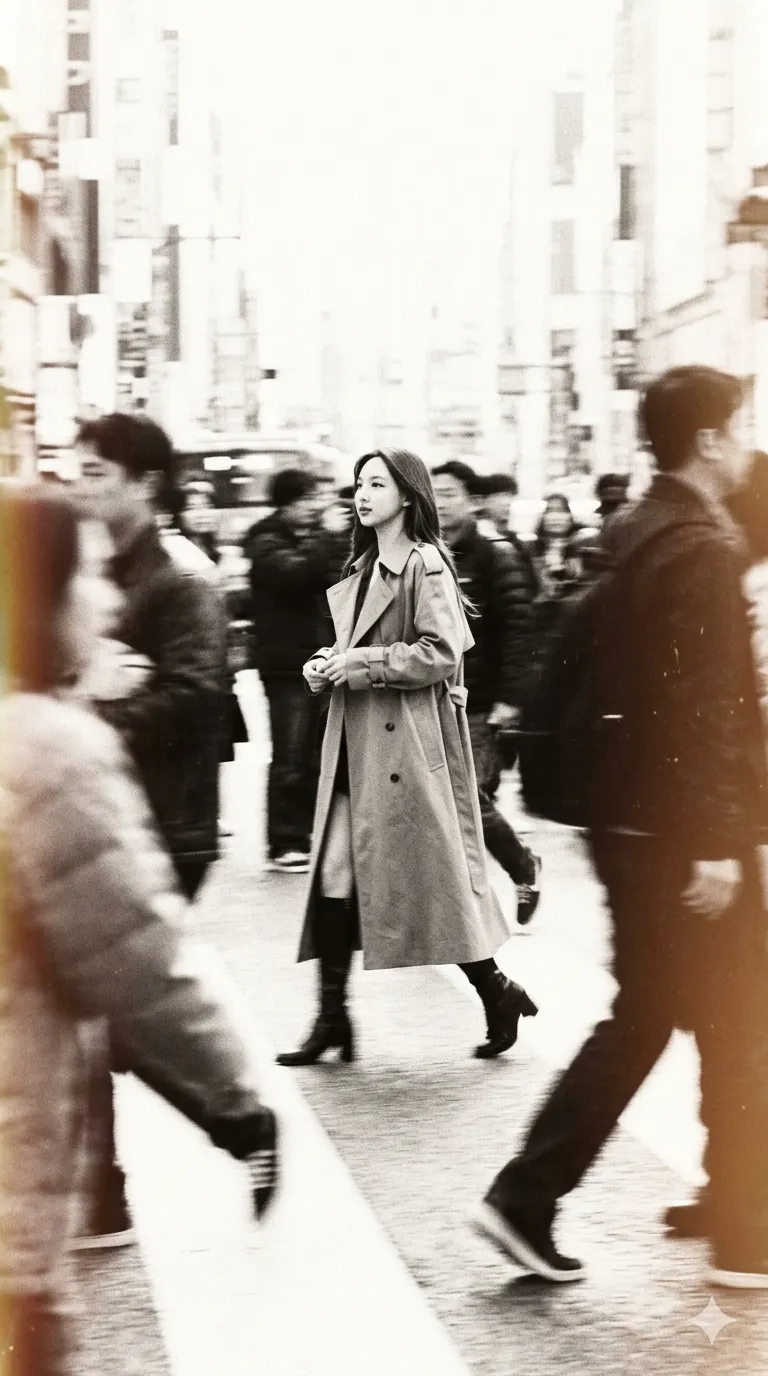
The Prompt
Black and white photograph of me with exact same facial and physical identity from the uploaded image walking through a crowd, motion blurred, taken from street level in the distance, with an ultra-thin lens, dressed in modern clothes, with other people moving in the background, taken with a Leica M3 film camera, monochrome, with high exposure and an antique glow effect. ar. 9:16.
How to Use
To get the best results with this prompt, load it into an AI tool that allows image referencing, like Midjourney or Gemini, so it accurately captures your face. If your generator doesn't use reference images, simply replace the 'uploaded image' text with a physical description of yourself. You can customize the mood by changing 'modern clothes' to something like '1920s trench coat' or 'cyberpunk streetwear.' If the image comes out too bright, remove the 'high exposure' keyword to bring back more contrast and deeper shadows in the monochrome aesthetic.
Prompt Variations
Cinematic photograph of a woman with exact same facial and physical identity from the uploaded image walking through a busy cyberpunk market, heavy motion blur on the crowd, taken from street level in the distance, dressed in futuristic techwear, with neon lights trailing in the background, taken with an anamorphic lens, high contrast, vibrant magenta and cyan glow effect. ar. 9:16.
Moody photograph of a man walking through a rainy London street, heavy motion blur on passing black cabs and pedestrians with umbrellas, taken from street level in the distance, dressed in a classic trench coat, taken with a 35mm film camera, desaturated colors, with a soft misty glow effect. ar. 9:16.
Warm cinematic photograph of a traveler walking through a massive train station concourse during rush hour, motion blurred commuters rushing by, taken from a low angle in the distance, dressed in casual travel gear, taken with a vintage medium format camera, rich golden hour lighting, high exposure and a warm sun-drenched glow. ar. 9:16.
High contrast photograph of a teenager walking through an underground subway platform, extreme motion blur of a passing train and rushing passengers, taken from chest level in the distance, dressed in 90s grunge streetwear, taken with a disposable flash camera, harsh fluorescent lighting, gritty film grain and a green-tinted glow effect. ar. 9:16.
Atmospheric photograph of a woman walking through a snowy evening outdoor market, motion blurred shoppers and heavy falling snow, taken from street level in the distance, dressed in a thick wool coat and scarf, taken with a classic 50mm lens, soft warm string light illumination, cinematic bloom and a frosty glow effect. ar. 9:16.
Fashion editorial photograph of a model walking through a chaotic backstage dressing area, motion blurred crew members and flashing cameras, taken from a low angle in the distance, dressed in avant-garde haute couture, taken with a high-end digital sensor, sharp center focus, high contrast monochrome with a blinding flash glow effect. ar. 9:16.
Vibrant photograph of a man walking through a dense music festival crowd, motion blurred hands and dancing silhouettes, taken from eye level in the distance, dressed in bohemian summer clothes, taken with a vintage Polaroid camera, heavy light leaks, overexposed pastel colors and a hazy sun-kissed glow effect. ar. 9:16.
FAQ
- Why is the motion blur affecting my face instead of just the background?AI generators can sometimes struggle to separate the subject from the background blur. If this happens, try adding phrases like 'sharp focus on the subject's face' or 'shallow depth of field with the crowd blurred out' to force the AI to isolate you from the movement.
- How do I remove the antique or vintage film look?Simply remove the keywords 'Leica M3 film camera,' 'monochrome,' and 'antique glow effect.' You can replace them with terms like 'modern digital photography,' 'vibrant natural colors,' and 'crisp high-definition lighting' to modernize the final image.
- Can I change the aspect ratio for an Instagram square post?Yes! The current prompt uses 'ar. 9:16', which is perfect for mobile screens, Reels, or TikTok. If you want a square post, change it to 'ar 1:1'. For a cinematic horizontal landscape shot, change it to 'ar 16:9'.
Related Prompts