Photorealistic 3D Origami
Generated Images
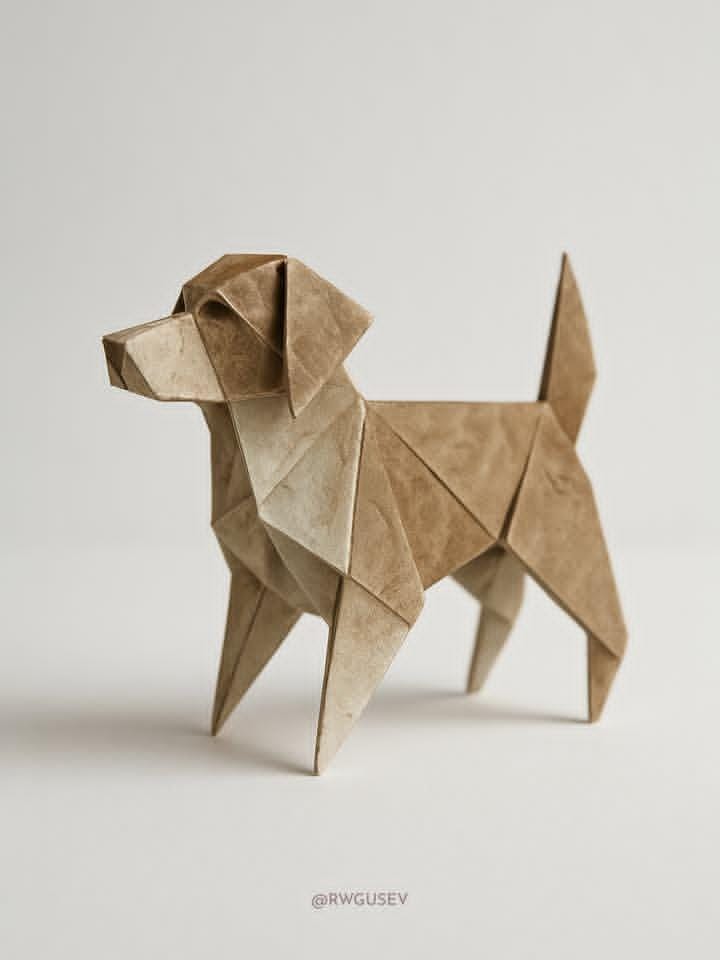

The Prompt
Generate a photorealistic 3D render of a single origami [model] crafted from dual-toned paper, hovering above a pristine white matte surface. Focus on intricate texture details: add subtle paper imperfections like crease wear, gentle crumpling, micro-scratches, and faint fingerprints to enhance realism.
Capture the subject from a medium-low angle, illuminated by soft, diffused studio lighting that creates gentle gradients and highlights the paper's texture. Maintain a minimalist, pure white matte background. Use a color palette dominated by the two distinct tones of the origami paper [color_1] and [color_2] against the white, with hyperrealistic rendering style emphasizing material accuracy and lifelike details.
How to Use
To use this prompt professionally, utilize it for origami art, minimalist designs, or paper craft promotions in education and decor. Preserve "photorealistic 3D render," "single origami [model]," "dual-toned paper," and "minimalist, pure white matte background" for lifelike details. Do not change the medium-low angle or diffused lighting. Changing model to "crane" could produce symbolic visuals, leading to creases, while boat keeps textured, hyperrealistic results.
Prompt Variations
1. 1. Dramatic Side Lighting
Best for emphasizing texture and shadows. Shifts from soft diffused lighting to a single, strong key light from the left side, creating deep, sharp shadows that dramatically define every crease and imperfection.
Photorealistic 3D render of a single origami [model] in dual-toned paper [color_1] and [color_2], hovering above a pristine white matte surface. Lit by a single dramatic key light from the left, casting sharp shadows that accentuate crease wear, crumpling, and micro-scratches. Medium-low angle, minimalist white background. Hyperrealistic rendering, material accuracy.
2. 2. Warm Studio Ambiance
Ideal for a softer, more inviting look. Changes the color temperature of the studio lighting to warm, golden tones, giving the white background a slight creamy tint and the paper colors a richer, cozier feel.
Photorealistic 3D render of a single origami [model] in dual-toned paper [color_1] and [color_2], hovering above a pristine white matte surface. Illuminated by warm, soft diffused studio lighting that creates a cozy ambiance. Subtle paper imperfections like crease wear and faint fingerprints are visible. Medium-low angle, minimalist warm white background. Hyperrealistic rendering.
3. 3. Floating Above Reflection
Great for a more polished, product-shot aesthetic. Replaces the matte surface with a glossy, semi-reflective white surface, allowing the origami model to have a soft, ghost-like reflection beneath it.
Photorealistic 3D render of a single origami [model] in dual-toned paper [color_1] and [color_2], hovering above a pristine glossy white surface with a soft reflection. Soft, diffused studio lighting creates gentle gradients. Paper details include crease wear, micro-scratches, and fingerprints. Medium-low angle, minimalist white background. Hyperrealistic.
4. 4. Macro Texture Detail
Perfect for a close-up, abstract study. Moves the camera to an extreme macro angle, focusing tightly on a small section of the origami to make the paper fibers, crease lines, and color transition the main subject.
Extreme macro photorealistic 3D render of a section of an origami [model] made from dual-toned paper [color_1] and [color_2]. Focus is on the intricate texture details: paper fibers, crease wear, micro-scratches, and the sharp color transition. Soft, diffused studio lighting. Minimalist pure white background. Hyperrealistic rendering, material accuracy.
5. 5. Suspended by Invisible Wire
Excellent for a sense of magic and levitation. Keeps the model hovering but adds a suggestion of it being suspended by an impossibly thin, almost invisible wire, adding a touch of narrative intrigue.
Photorealistic 3D render of a single origami [model] in dual-toned paper [color_1] and [color_2], seemingly suspended by an ultra-thin, nearly invisible wire above a pristine white matte surface. Soft, diffused studio lighting. Subtle paper imperfections. Medium-low angle, minimalist white background. Hyperrealistic.
6. 6. Moody Vignette Focus
Best for drawing the eye directly to the center. Applies a subtle dark vignette around the edges of the frame, naturally guiding the viewer's focus towards the brightly lit origami model in the center.
Photorealistic 3D render of a single origami [model] in dual-toned paper [color_1] and [color_2], hovering above a white matte surface. Soft diffused studio lighting, with a subtle dark vignette around the edges to focus attention on the model. Paper details: crease wear, gentle crumpling. Medium-low angle, minimalist background. Hyperrealistic.
7. 7. Prismatic Light Cast
Ideal for an artistic, colorful twist. Introduces a discreet glass prism somewhere off-frame that casts a small, faint rainbow spectrum onto the white surface near the origami, adding a magical touch.
Photorealistic 3D render of a single origami [model] in dual-toned paper [color_1] and [color_2], hovering above a pristine white matte surface. Soft, diffused studio lighting, with a faint rainbow spectrum cast onto the surface near the model from an unseen prism. Paper imperfections visible. Medium-low angle, minimalist white background. Hyperrealistic.
FAQ
- What is the subject of the render?A single origami [model] crafted from dual-toned paper.
- What imperfections are added for realism?Subtle imperfections like crease wear, gentle crumpling, micro-scratches, and faint fingerprints.
Related Prompts