Glowing Stone App Icons
Generated Images
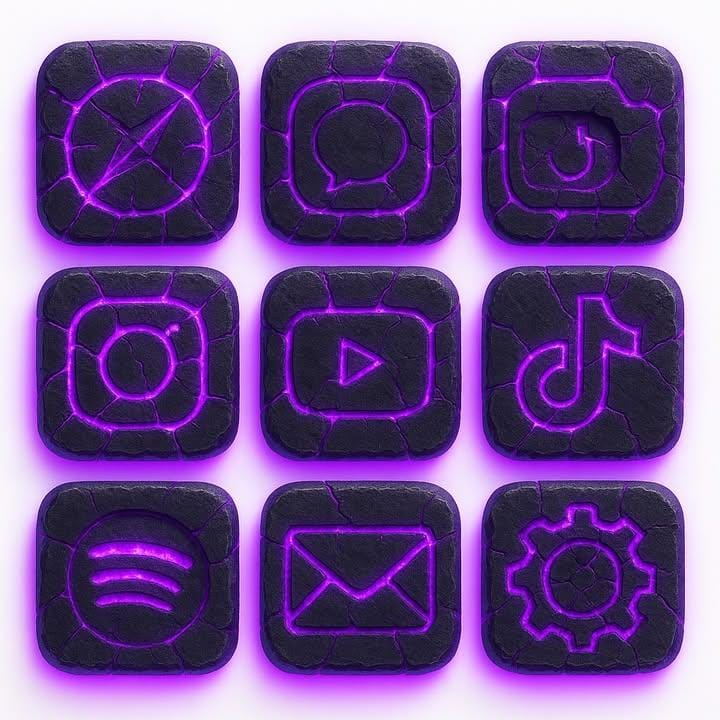

The Prompt
Create a set of 9 iPhone app icons in the following style:

Visual Style: Rounded square icons with a rugged stone texture, carved with cracks that emit a bright purple glow (neon violet with soft magenta highlights).Lighting & Background: Place each icon on a pure white background so the icons appear bright, clear, and luminous. The purple glow should softly radiate outward, making the icons look as if they are emitting light.

Material: Polished yet weathered stone with realistic cracks, glowing runes, and smooth highlights.

Consistency: All icons should match the same bright glowing style.
Icons to include:

Safari

Messages

Camera

Instagram

YouTube

TikTok

Spotify

Mail

Settings
The overall feel should be clean, modern, and magical — dark stone contrasted against a white background, with radiant purple energy shining through.
How to Use
To use this prompt professionally, integrate it into app icon redesigns, UI kits, or magical branding for tech and fantasy apps. Preserve "set of 9 iPhone app icons," "rugged stone texture," "bright purple glow," and "clean, modern, and magical" feel for consistency. Do not change the rounded square or white background. Replacing apps with "Facebook" could produce social icons, leading to radiant energy, while original yields glowing runes with dark stone contrasts.
Prompt Variations
1. 1. Emerald Glow Variant
This variation replaces the purple glow with a bright, mystical emerald green, offering a fresh, nature-inspired color scheme while maintaining the magical stone aesthetic.
Create a set of 9 iPhone app icons in the following style: Rounded square icons with a rugged stone texture, carved with cracks that emit a bright emerald green glow (neon green with soft mint highlights). Lighting & Background: Place each icon on a pure white background so the icons appear bright, clear, and luminous. The green glow should softly radiate outward, making the icons look as if they are emitting light. Material: Polished yet weathered stone with realistic cracks, glowing runes, and smooth highlights. Icons to include: Safari, Messages, Camera, Instagram, YouTube, TikTok, Spotify, Mail, Settings. The overall feel should be clean, modern, and magical.
2. 2. Fiery Orange Magma Style
The cracks now glow with intense orange and red light, giving the icons a volcanic, molten core appearance for a more aggressive and energetic look.
Create a set of 9 iPhone app icons in the following style: Rounded square icons with a rugged, basalt-like stone texture, carved with deep cracks that emit a bright fiery orange glow (with hot red highlights). Lighting & Background: Place each icon on a pure white background so the icons appear bright and clear. The orange glow should radiate outward like embers. Material: Polished yet weathered volcanic stone with realistic cracks, glowing runes, and smooth highlights. Icons to include: Safari, Messages, Camera, Instagram, YouTube, TikTok, Spotify, Mail, Settings. The overall feel should be clean, modern, and powerful.
3. 3. Icy Blue Aurora Theme
Shifts the glow to a cool, ethereal blue, reminiscent of ice or aurora borealis, creating a serene and mystical variation.
Create a set of 9 iPhone app icons in the following style: Rounded square icons with a rugged, frost-covered stone texture, carved with cracks that emit a bright icy blue glow (with soft cyan highlights). Lighting & Background: Place each icon on a pure white background so the icons appear bright, clear, and luminous. The blue glow should softly radiate outward, creating a cold, magical light. Material: Polished yet weathered ice-stone with realistic cracks, glowing runes, and smooth highlights. Icons to include: Safari, Messages, Camera, Instagram, YouTube, TikTok, Spotify, Mail, Settings. The overall feel should be clean, modern, and serene.
4. 4. Polished Obsidian Mirror
This version features an ultra-polished, mirror-like black obsidian stone, with the purple glow reflecting sharply on the smooth surface for a luxurious look.
Create a set of 9 iPhone app icons in the following style: Rounded square icons with an ultra-polished, mirror-smooth obsidian texture, carved with precise cracks that emit a bright purple glow (neon violet with soft magenta highlights). Lighting & Background: Place each icon on a pure white background so the icons appear bright, clear, and luminous. The purple glow should reflect sharply on the glossy surface. Material: High-gloss polished obsidian with realistic cracks and glowing runes. Icons to include: Safari, Messages, Camera, Instagram, YouTube, TikTok, Spotify, Mail, Settings. The overall feel should be clean, modern, and luxurious.
5. 5. Rough-Hewn Raw Stone
Emphasizes a more primal, unpolished stone texture with rough edges, making the magical glow inside contrast more starkly with the raw exterior.
Create a set of 9 iPhone app icons in the following style: Rounded square icons with a rough-hewn, unpolished raw stone texture, carved with deep, jagged cracks that emit a bright purple glow (neon violet with soft magenta highlights). Lighting & Background: Place each icon on a pure white background so the icons appear bright, clear, and luminous. The purple glow should flare intensely from the rough cracks. Material: Raw, unpolished stone with realistic, deep cracks and glowing runes. Icons to include: Safari, Messages, Camera, Instagram, YouTube, TikTok, Spotify, Mail, Settings. The overall feel should be clean, modern, and primal.
6. 6. Subtle Glow, Focus on Texture
Reduces the intensity of the glow to be more subtle and atmospheric, placing greater visual emphasis on the intricate detail of the stone and crack textures.
Create a set of 9 iPhone app icons in the following style: Rounded square icons with a highly detailed, rugged stone texture, carved with intricate cracks that emit a subtle, ambient purple glow (neon violet with soft magenta highlights). Lighting & Background: Place each icon on a pure white background so the icons appear bright and clear. The purple glow is a soft, atmospheric radiance from within the cracks. Material: Polished yet weathered stone with hyper-realistic cracks and faintly glowing runes. Icons to include: Safari, Messages, Camera, Instagram, YouTube, TikTok, Spotify, Mail, Settings. The overall feel should be clean, modern, and detailed.
7. 7. Crystal Geode Interior
The cracks are visualized as openings into a geode, revealing a sparkling, crystalline interior that glows with purple light, adding depth and complexity.
Create a set of 9 iPhone app icons in the following style: Rounded square icons with a rugged stone texture, carved with cracks that open up to reveal a sparkling crystal geode interior that emits a bright purple glow (neon violet with soft magenta highlights). Lighting & Background: Place each icon on a pure white background. The purple glow should radiate from the crystalline interior. Material: Weathered stone exterior with realistic cracks leading to a smooth, glowing crystal interior. Icons to include: Safari, Messages, Camera, Instagram, YouTube, TikTok, Spotify, Mail, Settings. The overall feel should be clean, modern, and magical.
FAQ
- What texture do the app icons have?They have a rugged stone texture, carved with cracks.
- What visual effect do the cracks have?The cracks emit a bright purple glow (neon violet with soft magenta highlights).
Related Prompts